




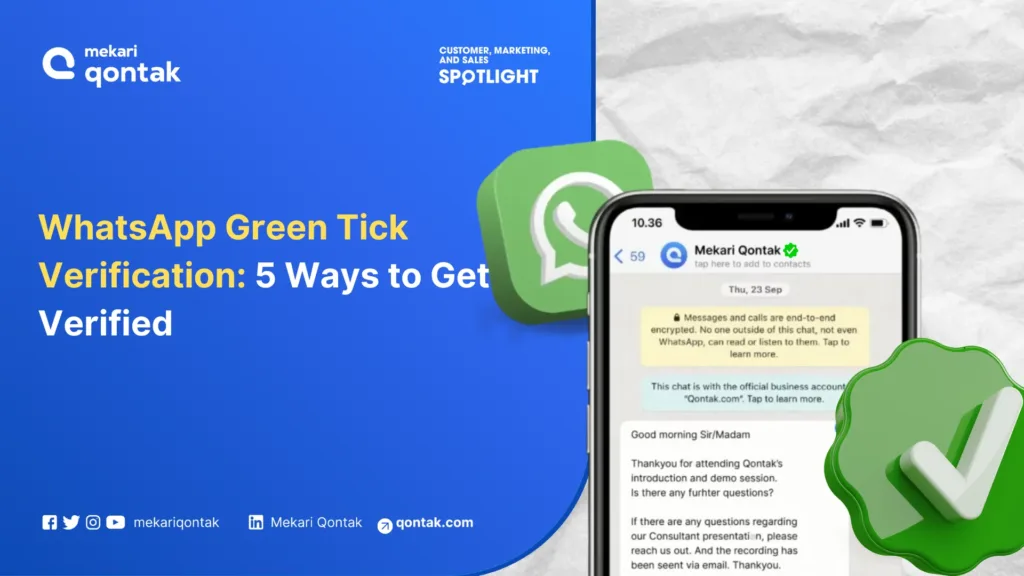
- WhatsApp Green Tick (Verified Badge) is an important verification mark for building an official and trustworthy business image in the customers.
- The WhatsApp Green Tick can enhance brand value, credibility, and sales, as well as expand market reach and build brand awareness.
- The main requirements for obtaining the WhatsApp Green Tick are having an official business or legal entity with supporting legal documents, using a Facebook
- Business Manager account, and being publicly recognized.
- The process of obtaining the WhatsApp Green Tick must go through a trusted WhatsApp Business Solution Provider (BSP), such as Mekari Qontak.
The verified green tick badge on a WhatsApp Business account can increase customer trust. This mark indicates that the WhatsApp account has been verified and proven to belong to an official business.
As reported on Meta’s official page, in mid-2024, Meta changed the green tick on WhatsApp to a blue tick to indicate verified accounts. This change was intended to align the appearance of Meta Verified on WhatsApp with other platforms (Facebook and Instagram).
In this article, the Mekari Qontak Blog will provide a comprehensive explanation of what the green tick or WhatsApp verified badge is.
What Is the WhatsApp Green Tick?
The WhatsApp Green Tick (Verified) is a mark indicating an official, verified WhatsApp Business account. By obtaining the WA green tick, businesses can increase customer trust.
The verified badge green tick symbol (or check mark) will appear next to your business name on the message recipient’s WhatsApp account screen, even if they have not saved your number. Indirectly, the WA verified logo can help you attract more customers.
Difference Between a Regular Business Account and an Official Business Account
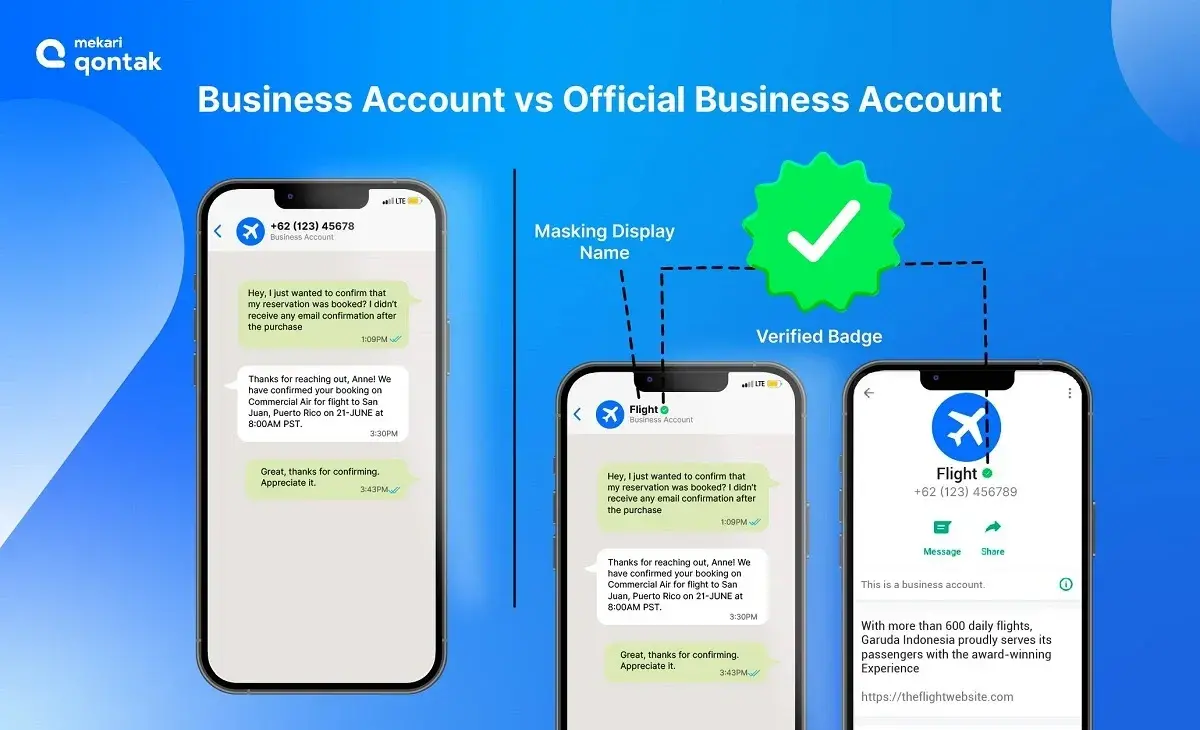
Here are the differences between WhatsApp Business Accounts and Official Business Accounts in the table below.
Use Left/Right arrow keys to scroll horizontally.
| Aspects of Differentiation | Business Account | Official Business Account |
|---|---|---|
| Definition | By default, any account using the WhatsApp Business App is considered a business account | An official business account has a green tick verification in its profile and chat thread headers |
| How to get | You can download it on the App Store and Play Store | You can only obtain it through a Business Solution Provider or Official WhatsApp Partner |
| Cost | Free | Paid |
| Features | Limited features | Provided with various advanced features |
WhatsApp Green Tick Benefits
The benefits of having your business account receive the WhatsApp green tick (verified badge) include the following:
1. Building Brand Value
The green tick on WhatsApp can enhance your business’s value from the customer’s perspective. The WA verified logo can play an important role as a differentiator between your business and others.
2. Increasing Credibility
The green tick on your WhatsApp Business account provides assurance that it is an official, verified business WhatsApp account (Official Business Account). This can increase customer trust while building business credibility.
3. Increased Sales
The WhatsApp green tick can help reduce hesitation among customers or business partners when conducting online transactions with your business. This has a positive impact on sales transactions, which can increase to their maximum potential.
4. Expanding Market Reach
Obtaining the WA green tick ensures that you can send WhatsApp broadcast messages to many contacts at once. You also do not need to save the recipient’s number, and vice versa, allowing you to reach a large number of customers in a short amount of time.
5. Building Brand Awareness
The WA green tick can also serve as a free medium for business name recognition and branding. When sending messages or communicating, your business name will automatically appear on the recipient’s chat screen without them having to save it first.
6. Integration with Other Applications
The WhatsApp verified badge can only be obtained through the WhatsApp Business API. The WA API has features that allow you to integrate with CRM applications and other popular applications. This makes it easier for you to manage customer relationship management.
7. Ability to Send WhatsApp Blast Messages
Another advantage is that businesses can send WhatsApp Blast messages. This important feature serves as a marketing medium without the need to save the prospect’s or customer’s number.
Messages will be sent simultaneously, and there is no limit to the number of contacts you can message.
8. Preventing Fraud
The green tick on a WhatsApp account serves as a trusted reference for customers. With the verified badge, customers can more easily distinguish between genuine and fake business accounts.
Customers will feel safer and more confident that they are interacting with an official party. As a result, the risk of fraud carried out under your business’s name can be significantly minimized.
9. Improving Customer Service
To obtain the WA green tick, one of the ways is to use the WhatsApp Business API provided by an official Business Solution Provider (BSP), such as Mekari Qontak.
When you use API, businesses can integrate WhatsApp with various advanced systems, including CRM, chatbots, and integration with other management systems.
This step will certainly enhance the overall customer experience.
Requirements for Obtaining the WhatsApp Green Tick
There are several requirements you need to consider before obtaining the WhatsApp green tick. Here are the requirements you must fulfill to get the green tick on WhatsApp.
1. Having an Official Business or Legal Entity
The primary requirement for obtaining the WA green tick is having an official business or legal entity. This can be proven with legal documents such as SIUP, TDP, NIB, NPWP, etc. However, not all types of businesses are permitted to register for the green tick on WhatsApp.
WhatsApp has established prohibited business categories as follows:
- Weapons and ammunition businesses
- Alcohol or hard liquor
- Gambling
- Illegal drugs/narcotics
- Live animal sales
- Medical products and healthcare
- Dating services
- Cryptocurrency-related businesses
- Tobacco products
- Adult products or services
2. Having a Facebook Business Manager Account
The second requirement for obtaining the WhatsApp green tick verification is a Facebook Business Manager account. If you do not have one, you can create a new account or use your personal Facebook account. Afterward, you can complete the requested information.
3. Business Is Publicly Recognized
Third, the business submitted for WhatsApp green tick verification must be sufficiently well-known to the public. This makes it easier to verify that the business is credible and deserving of the green tick.
The easiest way to demonstrate that your business is publicly recognized is by having an official website. This website will serve as strong evidence that you can attach when submitting for verification.
There, you can display your products, services, and official contact information, making your business appear professional and trustworthy.
4. Subscribing to an Official WhatsApp Business Solution Provider (BSP)
One of the requirements for obtaining the green tick (verified badge) on WhatsApp is subscribing to the services of an official and trusted WhatsApp Business Solution Provider (BSP), such as Mekari Qontak.
This is an important step because a BSP is an official WhatsApp partner that assists with the registration process for a WhatsApp Business API account and the verification of your account so that it can receive the green tick.
How to Get the Green Tick (Verified Badge) on WhatsApp
To obtain the WA green tick, you need to ensure that your WhatsApp account is verified. Here is how to verify your WhatsApp so your business receives the green tick (verified badge).
1. Prepare a Number for Your WhatsApp Account
First, prepare the number you will use for the verified WhatsApp account. The number can be a new contact or a number you have already used. Make sure the number is not being used on a personal WhatsApp account.
Please keep in mind that the number registered for the WhatsApp Business API account must always be active. This is because the number cannot be changed to another number.
In addition to preparing the WhatsApp account number, you also need to understand the terms and conditions of WhatsApp for obtaining the WA green tick, including:
- Facebook Business Manager account
- Business legal documents such as SIUP, TDP, NIB, NPWP, etc.
- Website, email, and other business information
2. Register Your Account with a WhatsApp Business Solution Provider
Second, after selecting the number to be used, register your WhatsApp account with the Official Business Solution Provider, Mekari Qontak.
Mekari Qontak provides services for officially obtaining the WhatsApp green tick through its verified WhatsApp system or platform for you to use.
Not only that, Mekari Qontak also provides end-to-end solutions that can connect the WhatsApp Business API with other chat applications or omnichannel solutions.
Mekari Qontak team understands that the needs, targets, and objectives of each company/business may differ; therefore, Mekari Qontak provides a range of features integrated with verified WhatsApp that can be tailored to your business needs.
3. Complete the Facebook Business Manager Verification
The next step is to verify your Facebook Business Manager account, simply by logging in using your Facebook account.
You can also request verification from Facebook Business Manager by following these steps:
- Log in to your Facebook Business Manager account and click “Business Settings.”
- Under your account, select “WhatsApp Accounts.” If you have multiple registered accounts, select the one you wish to request verification for.
- Select “Settings” and click “Contact Support.”
- Click “Ask a question” in the upper right corner and select “WABiz: Request official business account status.”
- Fill in the required information. Note: make sure you have set up 2-step authentication before proceeding with the business verification process.
- The request status will be available under the “Direct support” option in your Business Manager.
4. Your Official WhatsApp Business Account Will Be Registered by Mekari Qontak
Subsequently, the Mekari Qontak team will register your WhatsApp account as an Official WhatsApp Business.
This will allow you to access and use various advanced features available within the Official WhatsApp Business, including the green tick that can enhance your business’s credibility.
5. Wait for the Green Tick (Verified Badge) to Appear on WA Business Account
Finally, if your WhatsApp green tick verification request is approved, your WhatsApp Business account will automatically become an Official WhatsApp Business account.
This change is indicated by the appearance of the verified WA Green Tick directly next to the profile picture on your account.
What If the Green Tick Is Rejected by WhatsApp?
Even if your WhatsApp green tick verification request is rejected, there is no need to worry. You have the opportunity to appeal. You can resubmit your application according to the interval set by WhatsApp, which is 30 days after the rejection.
It is important to note that there are several reasons why your green tick verification request may be rejected by WhatsApp. These reasons include using a personal account, incomplete documents, the business falling under a prohibited category on WhatsApp, and others.
In the meantime, you can request assistance from the Mekari Qontak team as a business solution provider (BSP) to review or resubmit your WhatsApp green tick verification application.
However, if you ultimately still cannot obtain the WA green tick, you can still take advantage of other features available in the WhatsApp Business API.
Furthermore, WhatsApp has now made updates regarding the display of business names. Business names can now automatically appear for all business accounts when clicked, along with masking for business verification, and a green tick for official business accounts.
Increase Customer Trust with the WhatsApp Green Tick from Mekari Qontak!
So, obtaining the WhatsApp green tick (verified badge) is quite straightforward, right? However, please keep in mind that the green tick cannot be used on a regular WhatsApp account.
Therefore, you can use the services of Mekari Qontak, an official and trusted WhatsApp official business partner in Indonesia, to obtain the green tick or what has now become the blue tick for your verified WhatsApp Business account.
If you encounter any difficulties in obtaining the WA green tick, there is no need to worry, as the Mekari Qontak team is ready to assist you.
So, what are you waiting for? Consult your Business Needs with the Mekari Qontak expert team today!
Frequently Asked Question About WhatsApp Green Tick Verification (FAQ)
What is the WhatsApp Green Tick (Verified Badge)?
What is the WhatsApp Green Tick (Verified Badge)?
The WhatsApp Green Tick (Verified Badge) is a verification mark that indicates a business account is officially recognized by WhatsApp. This badge appears next to the business name in chats, even if the user has not saved the contact, helping increase trust and credibility.
Is the WhatsApp Green Tick still green or has it changed?
Is the WhatsApp Green Tick still green or has it changed?
The WhatsApp Green Tick has undergone updates by Meta. It has been changed to a blue tick to align with verification badges across other Meta platforms like Facebook and Instagram.
Can any business get a WhatsApp Green Tick?
Can any business get a WhatsApp Green Tick?
No, not all businesses can get a WhatsApp Green Tick. Businesses must meet specific requirements such as having a legal entity, being publicly recognized, and complying with WhatsApp’s policies. Certain industries are also restricted and cannot apply for verification.
How long does it take to get verified on WhatsApp?
How long does it take to get verified on WhatsApp?
The verification process timeline varies depending on factors such as document completeness, business credibility, and WhatsApp’s review process. It can take anywhere from a few days to several weeks.
Is the WhatsApp Green Tick free?
Is the WhatsApp Green Tick free?
No, businesses need to use the WhatsApp Business API through an official Business Solution Provider (BSP), which typically involves service and subscription costs.