


Click-to-WhatsApp Ads (CTWA) Software

Click-to-WhatsApp Ads (CTWA): one ad click, and prospects chat with you all the way to closing

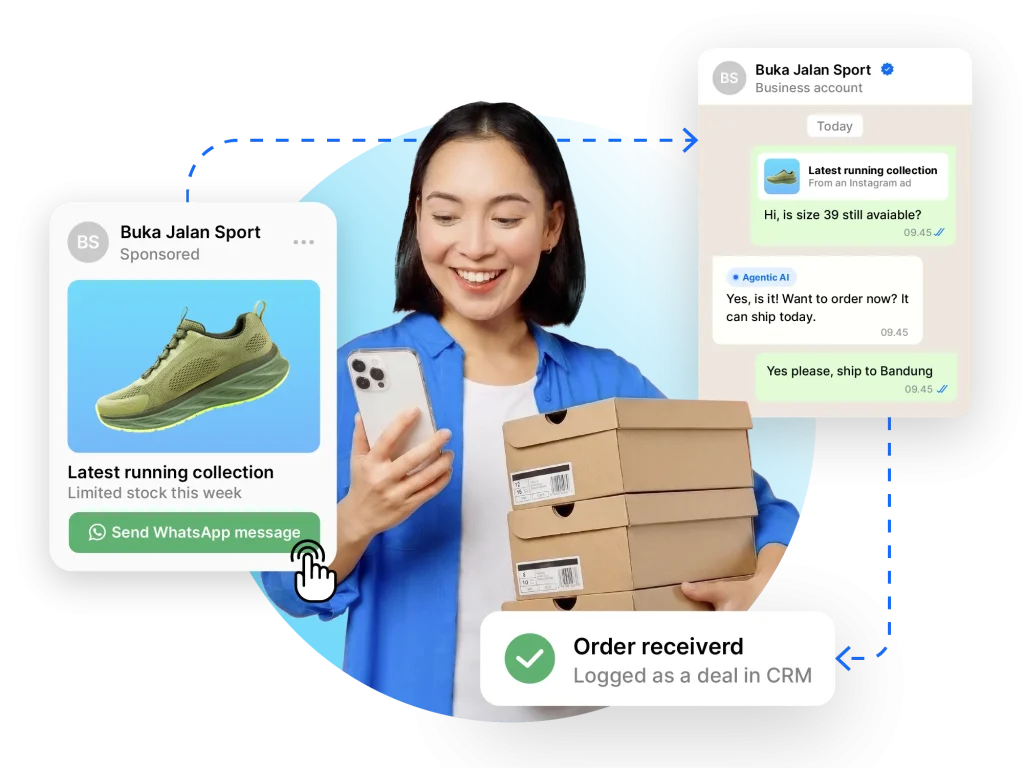
Prospects from your Facebook and Instagram ads land straight in your business WhatsApp chat, no form needed. Agentic AI replies within seconds, and every sale is tracked all the way to your ad report.

  • One click from Meta ads to WhatsApp chat
  • Chats from ads answered by Agentic AI, 24/7
  • Sales in chat reported to Meta through Conversion API
  • Leads logged automatically as CRM deals

How Click to WhatsApp Ads works, from first chat to measured sales

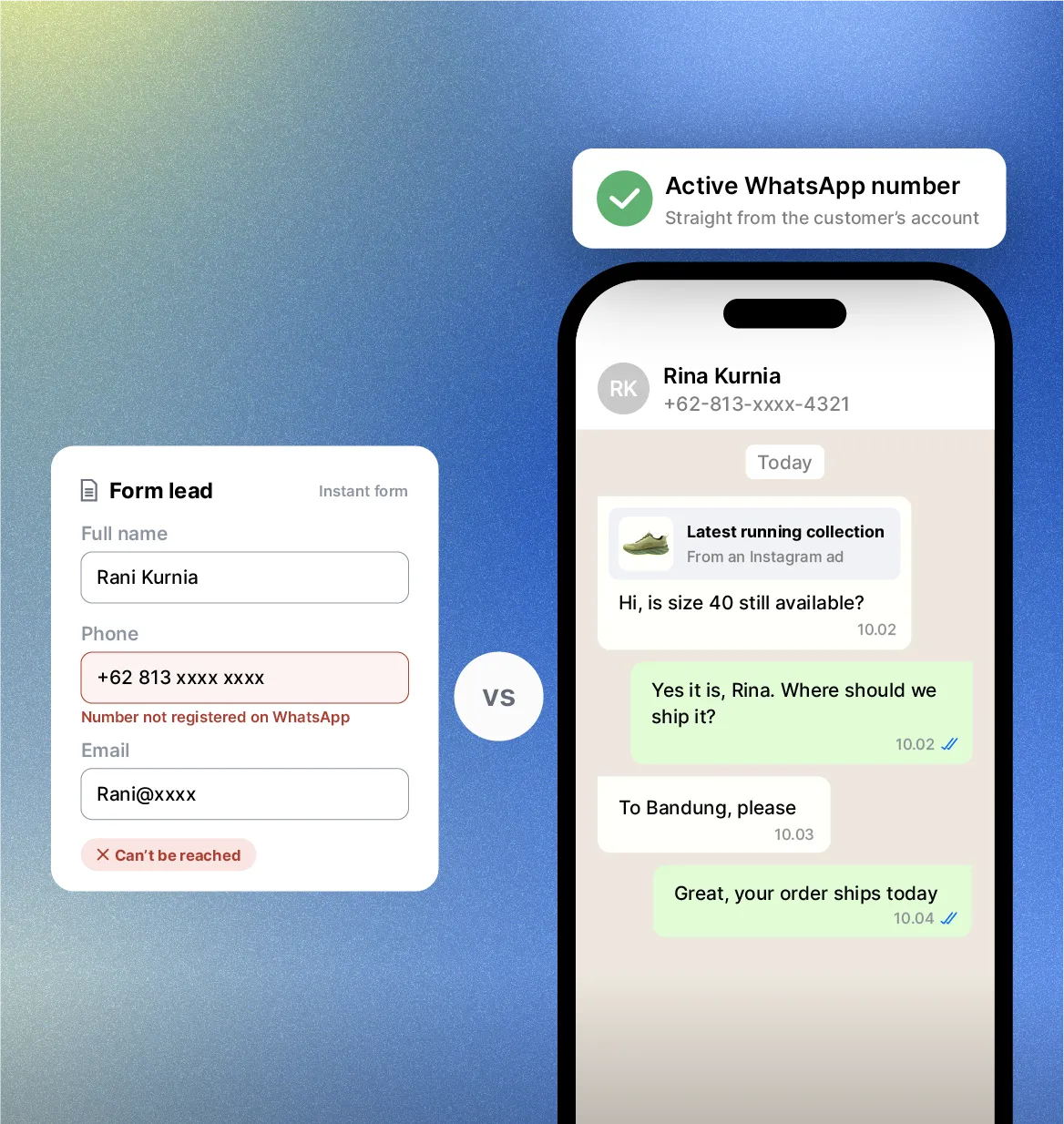
Real contacts, not numbers typed into a form 01

The number comes from the prospect’s own WhatsApp account, so there are no typos or fake data. Your team just replies in the same chat, no call-back needed.

  • Receive chats from Facebook and Instagram ads straight in your inbox
  • See the campaign, ad set and source ad of every chat
  • Manage multiple WhatsApp numbers from one account

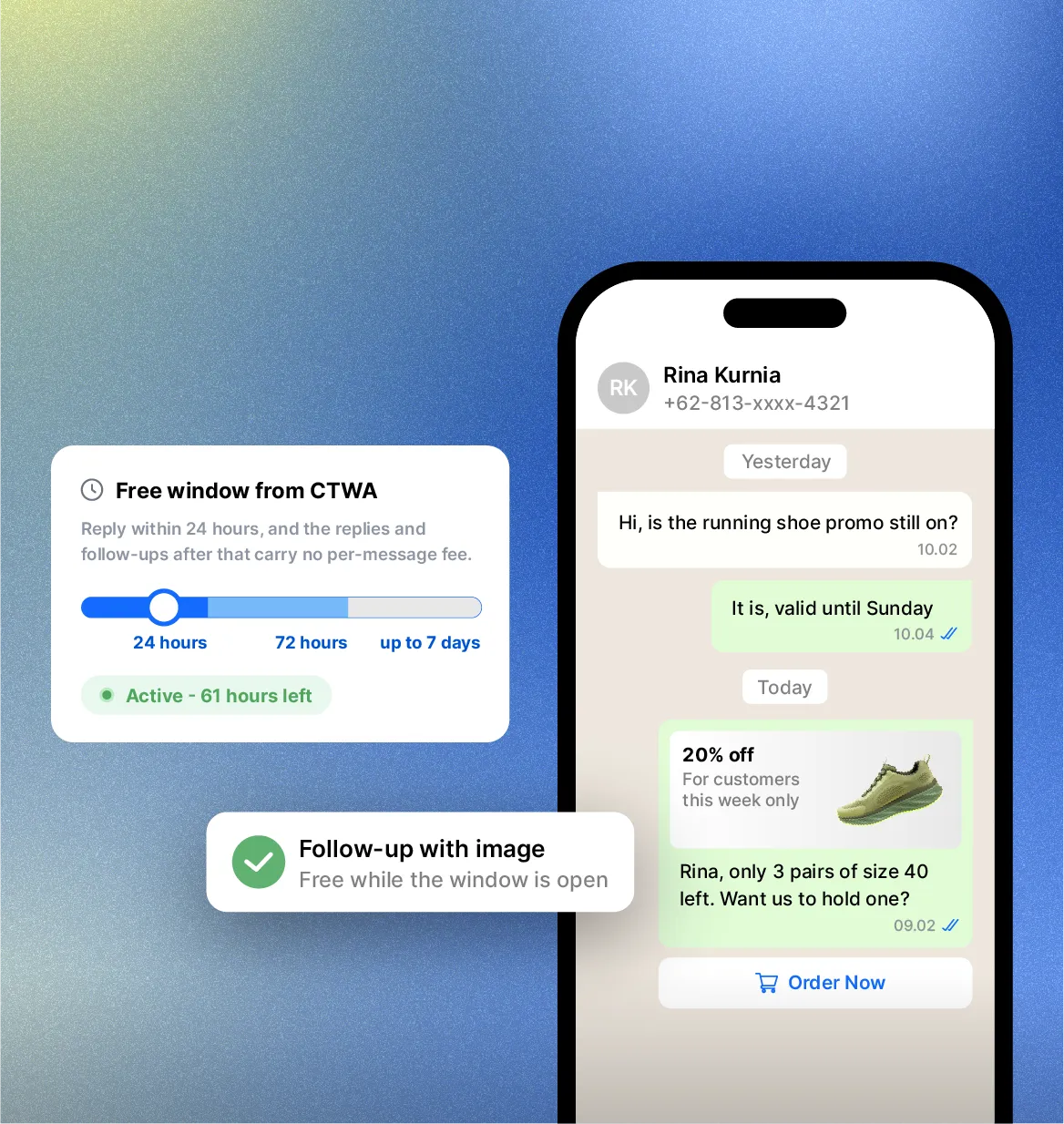
No message fees for 72 hours, up to 7 days 02

As long as you reply to a chat from an ad within 24 hours, the conversation that follows carries no per-message charge. Your team has time to answer, send an offer and close.

  • Reply to chats from ads within 24 hours to open the free window
  • Send offers and product details in the same chat
  • Follow up until the deal closes

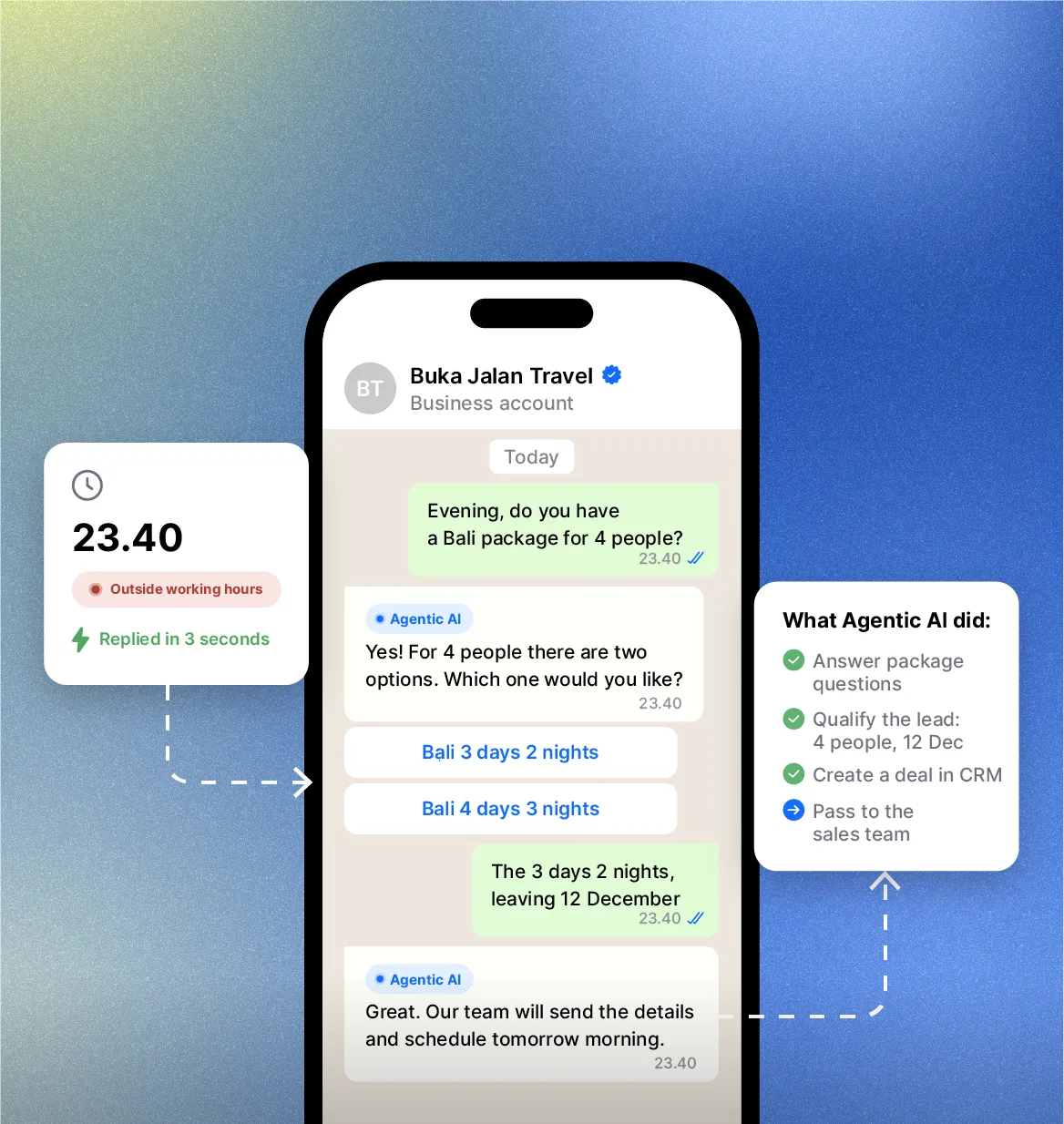
70% faster first response 03

Agentic AI answers chats from your ads within seconds, day or night, so leads don’t go cold. Serious leads go straight to sales with their chat history.

  • Reply to the first chat within seconds, 24/7
  • Answer product questions and qualify leads
  • Pass ready-to-buy leads to sales with the chat history

Measure sales, not just chat count 04

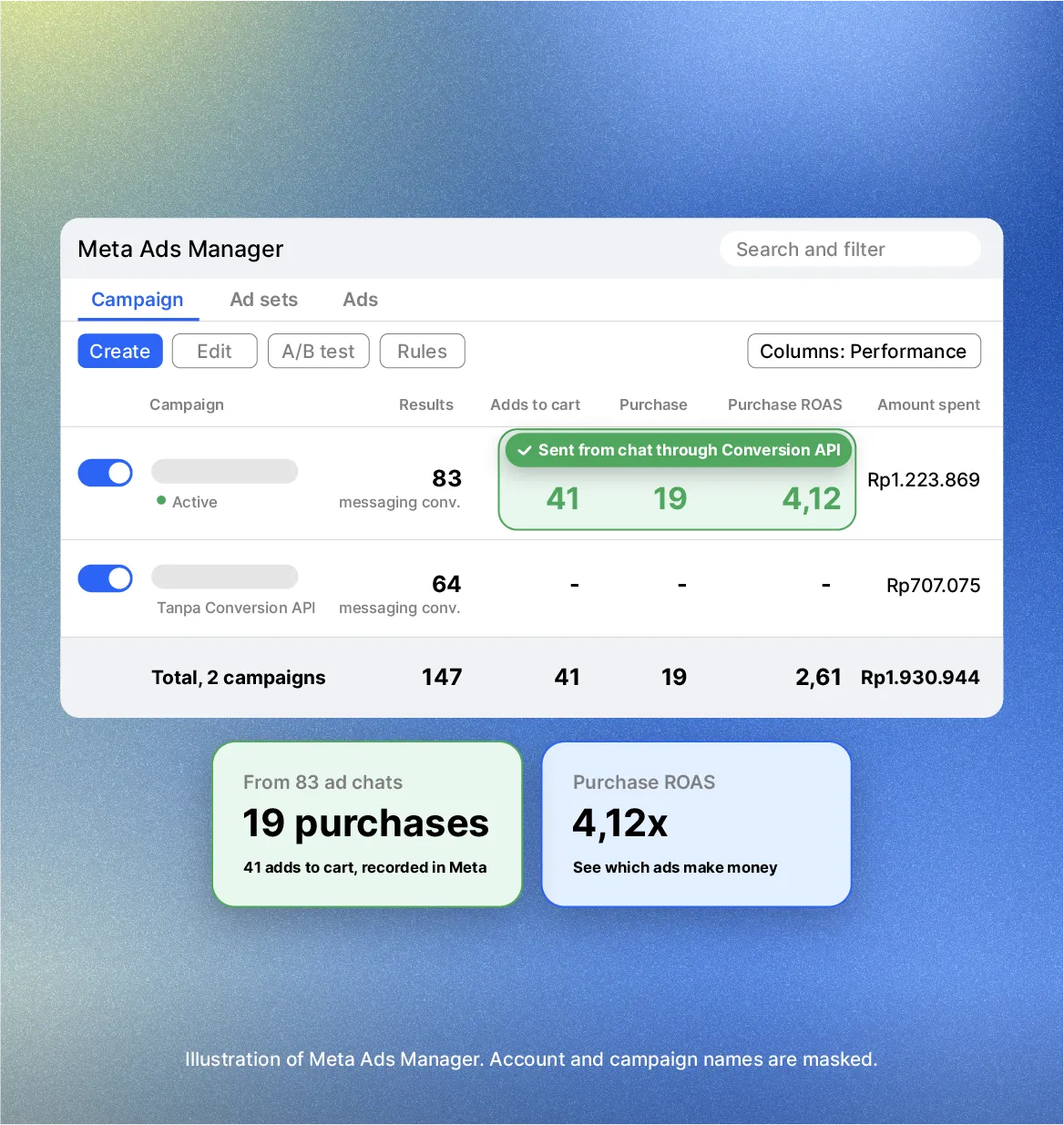
With Meta Conversion API, every transaction in chat is reported back to Meta. Your ad report shows purchases and ROAS, so you can see which ads actually make money.

  • Turn leads from chat into deals automatically
  • Report purchases to Meta through Conversion API
  • Check purchases and ROAS in the Click-to-WhatsApp Ads report

For all businesses across industries

Mekari Icon
Chatbot Example - Retail Industry
Inquire stock, Ask for promotions, Check the price
Mekari Icon
Chatbot Example - Travel & Hospitality
Book hotels, Book tickets, Book tour service package
Mekari Icon
Chatbot Example - Healthcare Industry
Make an appointment, Ask for promotions, Online consultation
Mekari Icon
Chatbot Example - Education Industry
Registration information, Course registration, Follow up lead
Chatbot Example - Retail Industry
Chatbot Example - Travel & Hospitality
Chatbot Example - Healthcare Industry
Chatbot Example - Education Industry

From ad, straight to chat

Compare three ways to get leads from Meta ads.
Landing page The ad opens a web page Instant form The ad opens a Meta form Click-to-WhatsApp The ad opens a chat
Flow Ad → page → chat or form Ad → form on Meta Ad → WhatsApp chat
Before the chat starts Open a page, then fill in a form Fill in a form first One click
Data you get Depends on the page form Typed by the user, prone to typos and fake data Active WhatsApp number and profile name
Can be contacted right away Depends on action taken on the page Needs manual follow-up Yes, reply in the same chat
Flow
Landing page
Ad → page → chat or form
Instant form
Ad → form on Meta
Click-to-WhatsApp
Ad → WhatsApp chat
Before the chat starts
Landing page
Open a page, then fill in a form
Instant form
Fill in a form first
Click-to-WhatsApp
One click
Data you get
Landing page
Depends on the page form
Instant form
Typed by the user, prone to typos and fake data
Click-to-WhatsApp
Active WhatsApp number and profile name
Can be contacted right away
Landing page
Depends on action taken on the page
Instant form
Needs manual follow-up
Click-to-WhatsApp
Yes, reply in the same chat
Each format has its place. Pick the one that fits how your team follows up on leads.

Mekari Qontak, more than just WhatsApp Business API

Sebuah bot mengirimkan pesan di aplikasi pesan, menampilkan antarmuka yang sederhana dengan ikon dan teks, menggambarkan interaksi digital yang modern.

Combination of chatbots and chat automation

Ensure fast response chat without having to be online all the time.

Ikon monitor menampilkan gelombang grafik, menunjukkan data yang dianalisis. Digunakan dalam konteks pemantauan kesehatan atau sistem teknologi.

CRM and omnichannel management

Manage all customer interactions across channels in one integrated CRM Omnichannel platform.

API berfungsi untuk menghubungkan aplikasi melalui permintaan data digital, mendukung pertukaran informasi dalam pengembangan perangkat lunak.

Conversion API integration

Monitor ad performance, from chat volume to potential lead conversions.

Trusted by 55,000+ businesses in Southeast Asia

Logo rumah sakit menampilkan nama
Logo berwarna biru menunjukkan nama
Logo Alodokter yang tertulis dengan huruf kapital berwarna biru, berfungsi sebagai identitas dalam konteks layanan kesehatan digital di Indonesia.
Logo Bank MAYORA terlihat menonjol dengan warna merah, menandakan identitas lembaga keuangan yang menawarkan berbagai layanan perbankan. Desainnya sederhana, menciptakan kesan profesional di sektor perbankan.
Logo BCA Insurance menampilkan nama perusahaan dengan warna biru yang cerah. Ini digunakan sebagai identitas dalam sektor asuransi di Indonesia.
Latar belakang merah menonjolkan teks dengan karakter yang sederhana, memberikan nuansa kuat dan menarik perhatian dalam konteks desain grafis.
Logo Faber-Castell menonjol dengan desain elegan. Teks menunjukkan reputasi merek dalam industri alat tulis sejak 1761.
Logo Gojek terlihat jelas dengan kombinasi warna hijau dan hitam, mewakili layanan transportasi dan pengantaran di Indonesia.
Logo GrandLucky Superstore dengan warna cerah menonjolkan nama brand. Dikenal untuk belanja barang sehari-hari dengan kualitas baik.
Dua karakter kartun ceria tersenyum, mengenakan topi kuning, mewakili merek HokBen. Latar belakang berwarna cerah memberikan kesan ramah dan mengundang selera makan.
Logo Hana Bank menampilkan elemen grafis yang dinamis dan modern, dengan kombinasi warna biru dan merah, menggambarkan identitas lembaga keuangan.
Logo Toyota-Astra Motor menonjol dengan huruf merah, mencerminkan identitas dan brand perusahaan otomotif yang terkemuka di Indonesia.
Logo Hyundai ditampilkan dengan jelas, menunjukkan identitas merek otomotif terkenal. Latar belakangnya berwarna biru, menambahkan kesan modern dan profesional.
Logo bulat berwarna kuning dengan tulisan
Logo kementerian menampilkan globe dan burung garuda, simbol negara, mencerminkan otoritas dan integritas dalam pengawasan publik di Indonesia.
Logo Mayapada Hospital menonjolkan nama rumah sakit dengan simbol hati yang terintegrasi. Menggambarkan komitmen terhadap perawatan kesehatan yang lebih baik.
Teks
Logo Novotel terletak di latar belakang gelap, mencerminkan identitas merek hotel yang modern dan profesional. Desainnya sederhana namun elegan.
Logo dengan kata
Logo Puma menampilkan seekor puma melompat, diiringi dengan nama
Logo Shell menampilkan simbol cangkang berwarna merah dan kuning, berfungsi sebagai identitas merek di industri energi dan bahan bakar.
Logo Transvision menonjol dengan kombinasi warna biru dan ungu. Desain modern ini mengkomunikasikan identitas merek sebagai penyedia layanan hiburan digital di Indonesia.
Sebuah rumah dengan gaya minimalis dan atap datar terletak di tengah taman yang rimbun, dikelilingi berbagai tanaman hijau dan bunga berwarna-warni.
Logo Tupperware berwarna merah muda menonjol di atas latar belakang putih, menggambarkan merek yang dikenal untuk produk penyimpanan makanan.

Frequently Asked Questions (FAQ)

What is Click-to-WhatsApp Ads (CTWA)?
Click-to-WhatsApp Ads (CTWA) is a type of advertising that allows customers to interact directly with your business via social media (Facebook & Instagram) to WhatsApp. Instead of directing customers to a website, CTWA speeds up the communication process through WhatsApp, ensuring a better customer experience with an easier and faster flow.
What differs CTWA from regular ads on Facebook and Instagram?

CTWA directly directs customers to WhatsApp without having to fill out a form or visit a landing page. This way, businesses can interact with customers through WhatsApp chat faster, increasing the chances of closing.

Do I need to have WhatsApp Business API to run CTWA?

CTWA can be used with a regular WhatsApp Business account, but using the WhatsApp Business API through Mekari Qontak provides more benefits such as automated chatbots, integrated CRM, and tracking ad results with the conversion API.
How can I measure the effectiveness of CTWA ads?

With Mekari Qontak’s conversion API, you can track more than just ad clicks, but also the number of leads who make actual interactions, make purchases, or ask questions. Based on this data, you can optimize your CTWA ads for maximum results.

Empower your team with a centralized knowledge management from Mekari Qontak

Together we redefine excellence in customer support.

Kotak hitam kecil berjejer di latar putih, menciptakan tata letak yang sederhana. Masing-masing kotak menambah elemen visual yang terorganisir.

Free training

Assistance for product implementation and training at no additional cost

Sebuah objek kotak hitam terlihat di tengah, dikelilingi oleh bingkai putih. Desain sederhana ini menciptakan kesan minimalis dalam ruang.

Live chat support

Assistance for any issues and questions on Mekari Qontak

Sebuah objek lembut berwarna cerah melayang di udara, dikelilingi oleh langit biru dan awan putih, menciptakan suasana ceria dan bebas.

ISO 27001

Data security certified with international standard