









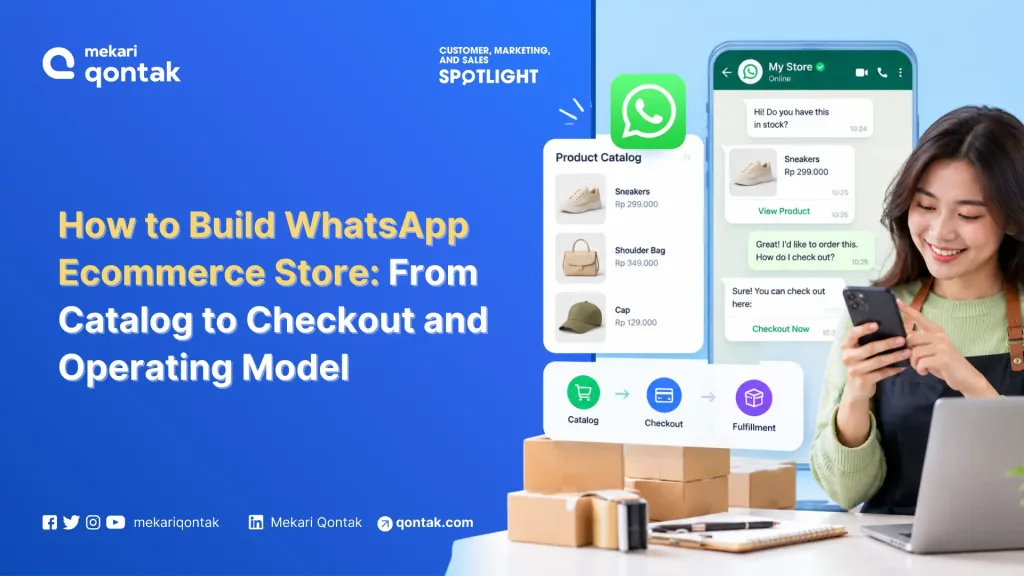
- A WhatsApp ecommerce store is a commerce setup on the WhatsApp Business Platform where customers browse a catalog, build a cart, and pay inside or alongside the chat.
- WhatsApp e-commerce store connects five core layers: verified sender identity, synchronized product catalog, automated chatbot conversation, secure checkout flow, and backend systems.
- Mekari Qontak WhatsApp Commerce combines WhatsApp Business API, chatbot AI, catalog & omnichannel inbox to help you manage the entire shopping journey from product browsing to payment.
WhatsApp stores face the same challenges, moving the cart into chat shortens the journey, but businesses still need clear pricing, trusted payment options, and recovery for declined cards.
Costs also matter. From October 1, 2026, Meta charges for service replies beyond the first 1,000 per business number each month and for utility templates sent within an open service window. More messages per order therefore mean higher costs.
WhatsApp ecommerce store connects five layers, sender identity, catalog, conversation, checkout, and order systems, so customers can browse, build a cart, and pay inside or alongside the chat while orders flow into backend systems.
In this article, Mekari Qontak Blog will walk through nine steps to build the store, how to choose a checkout route, and how to connect your systems.
What is a WhatsApp E-Commerce Store?
WhatsApp ecommerce store is a way to sell through WhatsApp conversations by connecting a product catalog, a cart, and a payment step to a WhatsApp Business Platform number, with orders handled by your backend systems.
Meta’s catalog documentation describes the flow as one where customers browse products, ask questions, and place orders without leaving the chat.
It is important to distinguish a WhatsApp ecommerce store from several other WhatsApp-based selling approaches:
- A catalog inside the WhatsApp Business app: Products are managed manually and the setup is primarily intended for direct customer conversations.
- A website storefront with WhatsApp hand-off: Customers complete their shopping journey on a website and WhatsApp is mainly used to send a pre-filled order message.
- A chatbot that answers product questions: The chatbot may handle customer inquiries but does not necessarily manage the catalog, cart, and order process.
The key difference is that a WhatsApp ecommerce store operates through the WhatsApp Business API, allowing orders, payment statuses, delivery updates, and other events to be passed to systems that can act on them.
In practice, the store is built from several connected layers. Each layer needs a clear owner, and the weakest layer can determine the overall customer experience.
How to Build a WhatsApp Ecommerce Store
To build a WhatsApp ecommerce store, businesses need to use the WhatsApp Business API to connect customer conversations with catalogs, checkout, and backend systems.
Unlike the WhatsApp Business app, the API enables businesses to automate shopping flows, manage orders, send status updates, and integrate customer data with other business systems.
1. Define the Pilot Scope and Confirm Your API Path
You can start with one market, one product category, and one checkout route. A narrow pilot lets you test the full path from first message to paid order before you add brands or countries.
Then confirm that the store will run on the WhatsApp Business API rather than the WhatsApp Business app. The app suits teams that read and answer chats by hand.
The API delivers orders and statuses to your systems automatically, so the rest of this guide assumes it. You are ready to move on when you can describe a successful first order in one sentence.
2. Register Your Business Number and Verify the Business
Businesses can upgrade from the WhatsApp Business app by registering their number through the appropriate WhatsApp Business Platform setup.
The process includes Meta business verification. If the business is approved, the account may be eligible to display a verified badge.
A Meta business portfolio contains the company’s WhatsApp Business Accounts. Verification can affect messaging throughput and eligibility for an Official Business Account.
Each verified account also has messaging limits and a quality rating. When multiple brands share a number, they also share that number’s reputation.
The default messaging throughput is 80 messages per second, while messaging the same user is limited to one message every 6 seconds, with short bursts allowed.
You can proceed once the following are in place:
- Business number registered
- Display name registered
- Business portfolio registered
- Business verification submitted
3. Prepare and Connect Your Product Catalog
Upload your products through Meta Commerce Manager or the Commerce API, then connect the catalog to your WhatsApp Business Account.
Each item carries a name, description, price, images, and availability, and a catalog can hold services as well as products.
Decide which system is the source of truth for product data and how often it syncs. When you mark an item unavailable, WhatsApp removes it from carts that customers have already built.
Choose the message format by job. A single-product message suits a deep link from an ad, while a multi-product message carries up to 30 products in sections and suits a curated set.
Design around the cart rules. A cart belongs to one chat thread on one device, you cannot send a cart to a customer, and a sent cart cannot be edited.
Messages sent through the Cloud API currently do not show the cart icon in the thread header, so add a visible prompt that tells customers where to find their cart.
WhatsApp also reviews catalog items automatically against its Commerce policies, and you can appeal a flagged item in Commerce Manager. Test the catalog by sending a product message to a phone, marking one item out of stock, and checking that the message updates.
4. Build the Shopping Flow with Chatbot Automation
The shopping journey can be built using chatbot automation. Within the chat panel, businesses can create a conversation flow that displays the catalog, submit the flow, and test it before making it live.
A typical flow can include:
- Greeting the customer
- Asking the customer to select a category
- Displaying a curated multi-product message
- Receiving the customer’s cart
- Confirming the order
- Handing the conversation to a human agent
A human agent should remain one tap away throughout the process.
The agent should be able to see the customer’s:
- Cart
- Order status
- Conversation history
This prevents customers from having to repeat information they have already provided.
Before launch, another colleague should be able to complete the shopping journey without assistance and reach a human agent from any step in the flow.
5. Choose the Checkout Route for Each Market
Select one primary payment route for each market. Depending on the market and supported capabilities, the options include:
- In-chat payment where Meta documents the functionality
- Payment link leading to a hosted payment page
- Website checkout hand-off using an existing ecommerce checkout
Businesses should confirm with the relevant contact which payment routes their account currently supports. The checkout should be tested from cart creation through payment confirmation, including what happens when a card payment is declined.
6. Set Up Message Templates and Customer Consent
WhatsApp templates are the only message type you can send outside the 24-hour customer service window, and they generally need approval before use. Submit templates for order confirmation, payment request, shipping update, and delivery exceptions first.
Meta requires opt-in before you message customers. Since its November 2024 policy update, the opt-in can be general rather than specific to WhatsApp, provided it follows local law, names your business, and states clearly that the person is agreeing to receive messages.
Bundling consent into general terms is presumed not to be freely given. Keep order-processing messages separate from marketing consent, and make withdrawal as easy as agreeing.
Before launch, every business-initiated message type should have an approved template and a stored opt-in.
7. Connect Orders, Customers, and Other Channels
Connect your WhatsApp store with your order management system, CRM system, and other sales channels using APIs and webhooks.
This allows order details and status updates to flow automatically between systems, while an omnichannel setup can give agents a unified view of customer interactions across channels.
Before going live, place a test order and verify that it is correctly recorded in the order system and CRM, including the customer’s phone number, consent status, and entry point. This ensures customer and order data remain consistent across connected systems.
9. Launch with One Entry Point and Complete Attribution
Launch through a single entry point, such as a Click-to-WhatsApp ad or a website button. Mekari Qontak’s page for these ads lists conversion API tracking of ad results among the benefits of using the WhatsApp Business API through its platform.
To attribute orders to ads, store the click identifier (ctwa_clid) that arrives in the inbound webhook on the customer’s record.
When the order completes, return a Purchase event through the Conversions API for Business Messaging, so Meta can optimize ads on orders instead of conversations.
Review the metrics and phase gates in the measurement section before you add markets. Confirm that conversations, orders, and ad clicks match, and write down your stop rules.
What the Checkout Design Needs to Fix
In Baymard’s survey of US shoppers, the reasons for leaving a cart once people were ready to buy were extra costs (40%), distrust of card handling (19%), forced account creation (18%), a long checkout (17%), a declined card (10%), and too few payment methods (9%).
Each reason translates into a chat rule: show the full total in the order message, never require registration, offer a retry after a declined payment, and offer the methods customers expect in that market.
Use Left/Right arrow keys to scroll horizontally.
| Checkout route | Where payment happens | Availability | Strength | Risk to manage |
|---|---|---|---|---|
| In-chat payment | Inside WhatsApp, through a supported gateway | Documented by Meta for India and Brazil | Fewest steps; status returns by webhook | Limited to documented markets; gateway setup per country |
| Payment link | A hosted page opened from the chat | Wherever your payment provider operates | Keeps card data out of the chat; reuses your provider | Link-trust concern; some drop-off at the redirect |
| Web checkout hand-off | Your website checkout, cart prefilled | Any market with a web store | Reuses fraud, tax, and promotion logic | Longest path; web abandonment baseline applies |
| Card number in chat | The chat thread | Technically possible, not recommended | None worth the exposure | PCI scope extends to the channel and related systems |
How to Integrate WhatsApp Ecommerce with Your Business Systems
The integration should be designed around events, allowing different systems to respond to what happens in the WhatsApp conversation.
1. Build a Webhook Spine
Inbound customer messages, submitted carts, and delivery statuses should reach the appropriate business systems through webhooks.
A typical order sequence can look like:
Cart received > Order created > Payment requested > Payment confirmed > Order confirmed > Shipping update utility template
This creates a consistent event flow across the ecommerce and customer service infrastructure.
2. Make Order Creation Idempotent
Repeated events or payment retries should not create duplicate orders.
The unique reference_id used in the order_details message can serve as a key for preventing duplicate order creation.
3. Establish Customer Identity
The customer’s WhatsApp phone number serves as the primary identifier.
The system should be able to match that identifier with the customer’s existing web record while retaining information such as:
- Consent status
- Customer entry point
- Ad click information
Businesses should also determine how the system handles customers who use two different phone numbers.
4. Enable Human Hand-Off
Meta supports control of the conversation between AI and human agents, while third-party AI solutions can also be used.
When a conversation is handed to an agent, the agent should have access to:
- Customer cart
- Order status
- Consent record
This prevents the customer from having to repeat information.
The cost implications of AI usage should also be considered as part of the billing model described in Step 8.
5. Account for API Limits
Account-management endpoints have a default limit of 5,000 requests per hour per app per active WABA.
There are also pacing limits at the individual-user level.
These limits matter when businesses perform activities such as:
- Catalog synchronization
- Bulk order updates
- Status updates
Rather than sending everything simultaneously, these activities should be scheduled appropriately.
WhatsApp Ecommerce Store Scaling Phases
A WhatsApp store needs a comparison point before it needs a dashboard. Build that baseline from your own web checkout data, not from industry averages.
1. Compare Each Entry Point with Web Checkout
Compare conversations from each entry point (ad, QR code, website button, inbound message) with web checkout from the same traffic source. Each entry point carries a different cost and a different free window, so blended numbers hide what works.
2. Track Seven Core Metrics
Use Left/Right arrow keys to scroll horizontally.
| Core Metric | How to define it | Compare against | Decision it informs |
|---|---|---|---|
| Conversation-to-order rate | Orders divided by conversations started, split by entry point | Web conversion for the same traffic source | Whether the flow design earns more investment |
| Cost per order | The formula from step 8 | Web cost per order, including payment fees | Which categories and markets belong in chat |
| Payment completion rate | Paid orders divided by payment requests sent | Web payment success rate | Which checkout route to use in each market |
| Average order value | Revenue per order, chat versus web | Web average order value | Whether catalog formats and bundles work |
| First-reply time | Time from customer message to first reply | Your internal service target | The mix of staffing and automation |
| Opt-out rate per marketing template | Opt-outs divided by marketing messages delivered | Earlier templates | Template quality and message frequency |
| Hand-off rate | Share of automated sessions escalated to an agent | The previous period | Where the chatbot or AI flow fails |
3. Scale in Three Phases
Use Left/Right arrow keys to scroll horizontally.
| Phase | Scope | Lead owner | Gate to move on |
|---|---|---|---|
| Pilot project | One market, one product category, one checkout route | Ecommerce or growth lead | Every pilot order reconciles with the order system, and the payment flow completes end to end |
| Expand | More categories or markets, plus campaigns and an AI layer | Marketing with customer service | Cost per order and payment completion meet the targets that finance set at baseline |
| Scale | Several brands and markets on one governed setup | IT and security with legal | The consent audit and access review pass, and stop rules are documented |
4. Write Stop Rules Before Launch
Agree on stop rules with finance and legal before launch. For example, pause marketing templates if opt-out or block signals worsen, and pause a market if cost per order exceeds the web equivalent for two consecutive review periods.
Set the exact thresholds from your own baseline.
Launch your WhatsApp ecommerce store with Mekari Qontak
Building a WhatsApp ecommerce store powered by the WhatsApp Business API allows businesses to integrate product catalogs, shopping carts, and payment flows directly within chat, shortening the buyer’s journey and reducing cart abandonment.
Mekari Qontak WhatsApp Commerce helps businesses bring these features together, enabling businesses to manage product catalogs, customer conversations, shopping flows, and transactions through WhatsApp Business API.
Explore how WhatsApp Commerce by Mekari Qontak can support your ecommerce operations and create a more connected shopping experience.
Consult your business needs with the Mekari Qontak team and get a free trial today.
References
Frequently Asked Questions About WhatsApp E-commerce Store (FAQ)
How do I build a WhatsApp ecommerce store from scratch?
How do I build a WhatsApp ecommerce store from scratch?
You can follow nine steps in order: define a pilot scope, register and verify a number, connect a catalog, build the shopping flow, choose checkout for each market, create templates and consent, connect your systems, estimate cost per order, and launch through one entry point with attribution.
Do I need the WhatsApp Business API, or is the WhatsApp Business app enough?
Do I need the WhatsApp Business API, or is the WhatsApp Business app enough?
The app is enough for manual, low-volume handling. The API is the path for a store whose orders, payments, and statuses must reach your systems automatically, and it runs through a solution provider such as Mekari Qontak or a direct integration.
Can customers pay inside WhatsApp, and in which countries?
Can customers pay inside WhatsApp, and in which countries?
In some markets, yes. Meta documents in-chat payments for India and Brazil, so elsewhere you would use a payment link or a hand-off to web checkout. Check availability for your country before you plan around it.
How do I connect a WhatsApp store to my ecommerce platform, order system, and CRM?
How do I connect a WhatsApp store to my ecommerce platform, order system, and CRM?
Connect through webhooks and an API. Inbound messages, carts, and status updates arrive by webhook, and your order system sends confirmations back as template messages. Mekari Qontak’s open API supports REST, OAuth 2.0, and webhooks for this.
What consent do I need before sending order updates and marketing messages?
What consent do I need before sending order updates and marketing messages?
Meta requires opt-in before you message customers, and the opt-in can be general if it follows local law and names your business. In the EU, consent must also be freely given, specific, informed, and unambiguous, with a record you can show.