








- WhatsApp message limit is the maximum number of unique users a business portfolio can reach with messages sent outside a customer service window within a moving 24-hour period.
- Meta now sets the limit per business portfolio rather than per phone number, and per-user marketing caps and pacing rules can slow or stop a send even when the portfolio still has capacity.
- WhatsApp Business API from Mekari Qontak helps teams send approved templates through Qontak Broadcast, review results in broadcast reports, and manage conversations in one omnichannel CRM.
Demand is real, which makes the rules around the channel worth understanding.
The rules have also changed quickly. Since October 2025, Meta sets the limit per business portfolio instead of per phone number, so every brand, region, and team draws from one shared pool.
In this article, Mekari Qontak Blog will discuss how the limit works, how it scales, what changed over the past year, and why per-user caps, pacing, and consent rules can stall a send even when the tier has room.
What Is a WhatsApp Message Limit?
A WhatsApp message limit is the maximum number of unique WhatsApp user phone numbers that a business portfolio can deliver messages to, outside a customer service window, within a moving 24-hour period.
Meta sets this limit at the business portfolio level, so every phone number in the portfolio shares it. The limit counts people, not messages. A business that sends five messages to one customer uses one slot, and replies sent inside an open customer service window do not count.
The 24-hour period moves with the clock instead of resetting at midnight. A new send therefore competes with everyone the business reached in the previous 24 hours.
Because the pool is shared, one phone number can use all of the portfolio’s capacity in a given period. For example, a retail group with several brands on one portfolio can see a promotion on one brand’s number leave less room for another brand’s order updates.
Sending speed is a separate control. Throughput governs how many messages per second a phone number can send, and it follows its own rules.
How WhatsApp Message Limit Scales from 250 to Unlimited
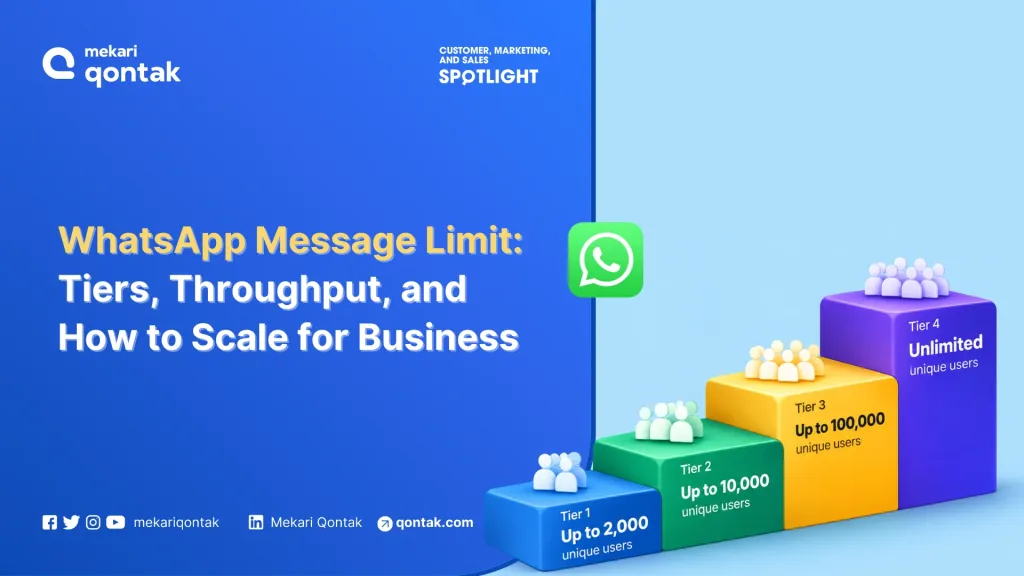
WhatsApp messaging limits can scale through several levels:
Use Left/Right arrow keys to scroll horizontally.
| Message Limit Level | Messaging Limit per 24 hours | How a portfolio gets there |
|---|---|---|
| Starting level | 250 | Default for a new business portfolio |
| First step | 2,000 | One scaling path: business verification, partner-led verification, or 2,000 delivered high-quality template messages within 30 days |
| Automatic | 10,000 | High-quality sends across all numbers and templates, and at least half of the current limit used in the last 7 days |
| Automatic | 100,000 | Same criteria, evaluated again from the previous level |
| Automatic | Unlimited | Same criteria, evaluated again from the previous level |
1. Start With a 250-User Limit
The initial messaging limit is 250 unique users within a 24-hour moving period.
This means the limit is not necessarily reset at midnight. Instead, WhatsApp evaluates the number of unique users reached during the previous 24 hours on a moving basis.
2. Increase to 2K Users
Businesses can move from the initial 250-user limit to 2,000 users when they meet WhatsApp’s requirements.
One of the requirements is delivering at least 2,000 high-quality template messages within 30 days.
This gives WhatsApp enough activity data to evaluate how recipients respond to a business’s messages.
3. Scale to 10K and 100K Users
Once a business continues to meet the relevant requirements and maintains message quality, the messaging capacity can increase to:
- 10,000 users
- 100,000 users
The purpose of these tiers is to allow businesses with healthy messaging activity to gradually increase their communication volume.
4. Reach Unlimited Messaging
Businesses can eventually reach an Unlimited messaging limit.
Automatic scaling can happen within 6 hours after a business uses at least half of its current messaging limit during the previous 7 days, provided the account continues to meet WhatsApp’s requirements.
You can check their current messaging limit through the Messaging Limits panel, Account Tools, or WhatsApp Manager.
For API users, the messaging limit can also be identified through the whatsapp_business_manager_messaging_limit field. For example, an account with the initial limit may return: TIER_250
What Changed in WhatsApp Messaging Rules Since 2025?
Meta changed the rules around business messaging four times between July 2025 and October 2026.
These changes affect how businesses manage messaging capacity, pricing, and message delivery.
Use Left/Right arrow keys to scroll horizontally.
| Date | Change | What it means for planning |
|---|---|---|
| 1 October 2026 | Meta charges for service messages above 1,000 free per business phone number each month, and for utility templates sent inside an open customer service window | The cost model needs an update, while the limit itself does not change |
| 8 December 2025 | Business portfolio pacing added for template messages | Large sends from some portfolios can be held and released in batches |
| 8 October 2025 | Limits became portfolio-based, and the first scaling step rose from 1,000 to 2,000 | One shared pool applies across numbers, and integrations that read the old field need review |
| 1 July 2025 | Per-message pricing went live | Each delivered template is billed individually |
Pricing follows a separate calendar. Meta updates rates only on the first day of a quarter, and rates differ by message category and recipient country, so teams should check the current rate cards before they budget a campaign.
Per-User Marketing Limits: The Cap Your Tier Does Not Control
Per-user marketing limits how many marketing templates one person receives, so a portfolio at its highest level can still see marketing sends fail.
WhatsApp adapts each cap to the person’s recent marketing read rate and the volume of messages in their inbox, and the cap applies across all businesses.
1. How the Per-User Cap Counts Messages
Each delivered marketing template counts toward the person’s limit. Marketing messages sent inside an open 24-hour customer service window do not count, so a conversation the customer starts is the one place where marketing content does not compete for the cap.
2. Where the Per-User Cap Applies
Meta states that per-user limits are not currently active for messages sent from or to the European Economic Area, the United Kingdom, Japan, and South Korea.
Marketing templates to US phone numbers are not delivered at all. A global contact list therefore needs segmentation by recipient region before a team schedules a send.
3. What to Do After Error 131049
Error 131049 means WhatsApp did not deliver a marketing template to maintain healthy engagement. You should wait at least 24 hours before they resend because repeated retries inside 24 hours can make further attempts to that user unavailable for up to 24 hours.
The block affects only that user, not sends to other users.
Why Opt-In Quality Affects Your WhatsApp Capacity
Opt-in quality affects WhatsApp capacity because blocks and reports feed the quality signals that gate scaling.
The consent standards also differ between Meta, regulators, and countries. So, marketing, IT, and legal teams need to resolve them together.
1. Meta’s Opt-In Standard
Meta’s opt-in rules require the opt-in to name the business and state that the person agrees to hear from it. A business can collect the opt-in outside WhatsApp, and since November 2024 a general opt-in can be valid where local law allows.
Separate opt-in by message category reduces the risk that people block the business.
2. The Opt-Out Obligation
The WhatsApp Business Messaging Policy requires businesses to respect any request to block or stop messages, on or off WhatsApp, including removing the person from contact lists.
A stop request sent by email therefore applies to the WhatsApp list as well.
3. The GDPR Standard
The EDPB’s consent guidelines treat pre-ticked boxes as invalid, expect the controller to demonstrate consent, and require withdrawal to be as easy as giving consent. Meeting Meta’s policy therefore does not by itself meet this standard.
4. A Regional Example
Indonesia’s Personal Data Protection Law requires controllers to hold proof of consent. According to a CMS summary, controllers must also stop processing within 72 hours after a person withdraws consent.
Your team should confirm the obligations that apply to them against the statute text.
5. One Shared Consent Rule
Marketing, IT, and legal teams can agree on one consent record per recipient, opt-in by message category, and an opt-out feed into the sending system. That rule keeps the list that reaches WhatsApp consistent with the consent each regulation expects.
How Mekari Qontak Supports Sends Within WhatsApp Limits
Meta sets the WhatsApp limits and no provider can change them, but the tools around sending shape how well a team works inside them.
Mekari Qontak is an official WhatsApp Business Solution Provider and Meta Business Partner in Indonesia, certified ISO 27001:2022 by BSI and registered with Komdigi as an electronic system operator.
These are how Mekari Qontak WhatsApp Business API can support your business.
1. WhatsApp Business API Access
WhatsApp Business API Mekari Qontak covers chat, call, group, and flow, with some items conditional on the plan. Mekari Qontak also supports business verification and the verified badge (blue tick), and verification is one of the scaling paths to a 2,000-user limit.
2. WhatsApp Broadcast
WhatsApp Qontak Broadcast allows businesses to distribute messages to customer segments while managing communication from a centralized platform.
Businesses can use customer data and segmentation to plan campaigns rather than sending the same message indiscriminately to every contact.
3. Email Broadcast
For businesses that communicate with customers across multiple channels, Mekari Qontak also provides email broadcast capabilities.
This allows businesses to combine WhatsApp communication with email campaigns as part of their broader customer communication strategy.
4. Omnichannel CRM
Mekari Qontak connects WhatsApp with other customer communication channels, including Instagram and marketplaces.
Businesses can also use CRM software capabilities to manage customer information and interactions in one system.
An AI Chatbot can further support automated customer conversations and help businesses handle recurring inquiries.
5. AI Chatbot and Chatbot Builder
Mekari Qontak Chatbot AI allows teams to use the chatbot builder to create and manage AI-powered chatbot interactions. It allows businesses to design chatbot conversations based on their specific customer service needs and automate responses to customer inquiries.
The available plan capacity may vary, including limits on the number of active AI chatbots and monthly AI dialogs. Teams should therefore review the current plan limits when deciding the appropriate scope for a pilot.
Plan WhatsApp Sends Around Message Limits with Mekari Qontak
WhatsApp message limits are not simply a matter of how many messages a business is allowed to send.
Businesses need to consider several factors at the same time, including their current messaging tier, message quality, per-user marketing limits, portfolio pacing, opt-in quality, and messaging costs.
With Mekari Qontak, you can manage WhatsApp Business API, broadcasts message, CRM software, omnichannel inbox, reporting, and customer conversations from one platform.
Learn how Mekari Qontak WhatsApp Business API can support your sending plan. Consult your business needs with the Mekari Qontak team and get a free trial today.
References
Frequently Asked Questions About the WhatsApp Message Limit (FAQ)
How Many Unique Users Can a New WhatsApp Business Portfolio Message in 24 Hours?
How Many Unique Users Can a New WhatsApp Business Portfolio Message in 24 Hours?
A new business portfolio can message 250 unique users in a moving 24-hour period. Completing a scaling path, such as business verification, raises the limit to 2,000.
Do Replies Inside the Customer Service Window Count Toward the Limit?
Do Replies Inside the Customer Service Window Count Toward the Limit?
No. The limit applies to messages sent outside a customer service window, so replies inside an open window do not use a slot.
Is the WhatsApp Message Limit Set per Phone Number or per Business Portfolio?
Is the WhatsApp Message Limit Set per Phone Number or per Business Portfolio?
The limit is set per business portfolio. Since 8 October 2025, every phone number in the portfolio shares it, so one number can use all of the available capacity.
How Do Business Increase a WhatsApp Message Limit, and How Long Does It Take?
How Do Business Increase a WhatsApp Message Limit, and How Long Does It Take?
You can complete one scaling path to reach 2,000, then keep sending high-quality messages and use at least half of the current limit within 7 days. Once these criteria are met, Meta raises the limit by one level within 6 hours.
What Is the Difference Between the Messaging Limit, Throughput, and Per-User Marketing Limits?
What Is the Difference Between the Messaging Limit, Throughput, and Per-User Marketing Limits?
The messaging limit caps the unique users a portfolio can reach in 24 hours. Throughput caps how many messages per second a phone number can send, and the per-user marketing limit caps how many marketing templates one person receives from all businesses.