









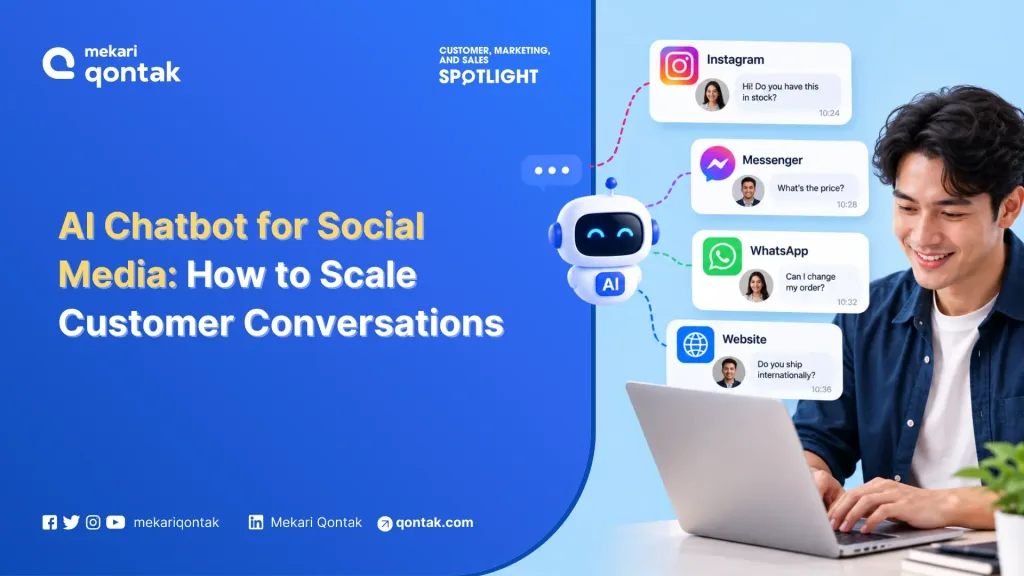
- AI chatbot for social media is software that answers customer messages on channels such as Instagram, Facebook Messenger, and WhatsApp, and passes complex cases to a human agent.
- Businesses need to connect official channels, maintain conversation context, use approved knowledge and integrate with business systems to build effective social media chatbot.
- Mekari Qontak AI Chatbot works alongside omnichannel inbox, company knowledge, agent handoffs, and reporting capabilities to help businesses centralize and automate social media conversations.
Instagram, Facebook Messenger, and WhatsApp now work as service desks for many brands.
Customers also expect quick answers at any hour. Zendesk found in its CX Trends 2026 survey that 74% of consumers expect customer service to be available 24/7.
Many companies respond by adding an AI chatbot for social media, and when each channel gets its own bot, teams risk split conversation histories, missed handoffs, and answers that nobody approved.
The technology is software that talks with customers inside their messaging channels and brings in a person when needed. In this article, Mekari Qontak Blog explains how it works, where its limits sit, how to measure results, and how to organize the teams around it.
What Is AI Chatbot for Social Media?
AI chatbot for social media is an artificial intelligence-powered messaging solution integrated with platforms such as Instagram, Facebook Messenger, WhatsApp, and X (formerly Twitter) to interact with users through real-time, human-like conversations.
It differs from a keyword or button bot, which follows fixed paths, and from AI writing tools, which produce or schedule posts instead of conversations.
An AI chatbot also differs from an agent-assist tool, which only drafts replies for a human to send. The chatbot speaks to the customer directly, so the quality of its answers becomes a brand matter.
The platform sets the boundaries of every conversation. On Instagram, an app can message a user only after that user writes first, and Meta gives the app 24 hours to respond.
Replies from human agents get a tagged exception for slower cases, so a well-built chatbot plans its handoffs before the window closes.
How AI Chatbot Handles a Conversation Across Instagram, Facebook Messenger, and WhatsApp
The conversation flow looks similar on every channel, while the rules around it differ. The following six steps cover the process from the first customer message through ongoing review.
1. Connect Through Official Business Channels
Official business channels give a chatbot legitimate access to customer messages.
A business connects its Instagram professional account, Facebook Page, or WhatsApp number through Meta’s messaging APIs, either directly or through an authorized provider. The reply-timing rules described above come with that access.
2. Recognize Intent and Carry Context
Intent recognition allows the chatbot to understand what a customer needs even when the message is short, contains spelling errors, or combines Bahasa Indonesia and English.
Maintaining context is equally important. A customer who asked about an order on Instagram in the morning should not have to provide the same information again on WhatsApp in the evening.
Before launch, your team should test the chatbot against samples of their actual customer conversations.
Real customer language often differs significantly from the phrasing used in product demonstrations, so testing with live conversation patterns helps expose gaps before they affect customers.
3. Answer from Approved Knowledge
Approved knowledge means the chatbot answers from documents the company has reviewed, such as price lists, return policies, and product guides.
A model that answers from its own general memory can invent a refund rule or a delivery promise, and the customer will treat that answer as the brand’s word.
The U.S. National Institute of Standards and Technology lists confabulation among the risks specific to generative AI in its AI 600-1 profile.
The knowledge base therefore needs a named owner who keeps it current and reviews the questions the chatbot could not answer.
4. Take Actions Through Integrations
Integrations let the chatbot do more than talk. It can check an order status, book an appointment, or open a support ticket in the systems behind the inbox.
Each action is a permission decision. Teams can start with read-only actions such as order lookups, and add write actions such as refunds or address changes only after someone in the business approves the rule.
5. Hand Over with Context
Handover moves a conversation from the chatbot to a human agent, and it works only when the agent receives the chat history and a short summary.
Meta’s Conversation Routing for Messenger lets one app hold a thread and pass control to another. For example from an AI support app to a customer care app. It replaces the older Handover Protocol, which Meta no longer supports on Messenger.
Timing matters as much as mechanics. Across five studies, Crolic et al. in Oxford University Research Archive that angry customers were less satisfied when a humanlike chatbot handled them, because the bot failed to meet inflated expectations.
Complaint conversations therefore deserve an early route to a person.
6. Log, Review, and Improve
Conversation logs show where the chatbot fails. A weekly review of unanswered questions, wrong answers, and escalations turns those failures into knowledge updates. The same logs feed the measurement framework in the next section.
Measuring Results: A Framework That Separates Speed from Resolution
AI Chatbots can improve response speed quickly, but speed alone can give a misleading picture of performance. A more useful measurement framework combines a baseline, resolution metrics, and predefined stop conditions.
1. Set a Baseline Before Launch
A baseline gives the team a reference point for evaluating the chatbot. Before deployment, record about four weeks of first response time, resolution time, agent hours per conversation, satisfaction scores, and repeat contacts.
Once the baseline is established, pilot the chatbot on two or three conversation types and measure the same indicators. This makes it possible to compare performance before and after automation rather than judging the program from chatbot speed alone.
2. Track Resolution
Resolution metrics show whether the customer’s problem was actually solved. A randomized test on Alibaba’s Taobao platform shows why this matters.
The share of customers who returned with the same issue within three days did not change significantly, and only about 15% of chats received a rating at all. Ratings alone can therefore flatter a program, while repeat contact tells the fuller story.
Use Left/Right arrow keys to scroll horizontally.
| Metrics | What It Tells You | Watch Out For | Owner |
|---|---|---|---|
| First response time | Speed of the first reply | A chatbot makes this look good whatever the answer quality | Service lead |
| Automated resolution | Share of chats solved without a person and with no return | Counting abandoned chats as solved | Service lead |
| Repeat contact within 3 days | Whether the issue was truly solved | Needs customer matching across channels | Service and data teams |
| Handoff rate and quality | Health of the chatbot-to-agent design | A very low rate can mean customers are stuck | Service operations |
| Satisfaction, chatbot-only vs. human-handled | Perceived quality | Low response rates skew results | Service lead |
| Cost per resolved conversation | Economics | Ignoring escalation and knowledge upkeep time | Finance with service lead |
3. Define Stop Conditions in Advance
Stop conditions define when the team pauses or narrows the chatbot. Thresholds differ by industry and conversation type, so each team should set its own from the baseline, for example a repeat-contact rate or complaint volume that rises past an agreed level.
The cost side needs the same discipline. Agent time spent on escalations and on knowledge upkeep belongs in the calculation when the team weighs cost against benefit.
Rollout Design: Who Owns the Chatbot, the Knowledge Base, and the Handoff
Most social chatbot programs stall on ownership rather than on technology.
Five functions usually share the work, and a phased rollout keeps the effort manageable: governance and baseline first, then a pilot on two or three conversation types, then expansion by channel.
1. Customer Service Owns Intents, Escalation, and the Weekly Review
Customer service team keeps the list of conversation types the chatbot handles, the escalation rules, and the weekly review of unanswered questions. Repeat contact, rather than first response time, is its headline metric. Agents benefit from AI support as well.
2. Marketing and Growth Plan for Campaign Volume
Marketing and growth teams send customers into chats through ads and campaigns, so message volume arrives in bursts. In those moments the chatbot becomes the first sales conversation.
Marketing team should share campaign calendars with the service team and check Meta’s rules on promotional messages before automating any outreach.
3. Sales Receives Qualified Conversations with Context
Sales teams receive better leads when the chatbot collects the basics first, such as product interest, location, and purchase timing.
The handoff should carry the chat history into the CRM record so the customer never repeats the same answers. A salesperson who opens a lead with full context can start with the next question.
4. IT Controls Integrations, Permissions, and Vendor Review
IT determines which systems the chatbot can access and whether it has permission to read from or write to those systems. The team also reviews the vendor’s security and hosting arrangements.
IT should ensure conversation logs are stored in a format that Legal and service leaders can search when they need to review conversations, investigate issues, or respond to data-related requests.
5. Legal and Compliance Own Notices, Retention, and Requests
Legal and compliance review what the chatbot tells customers in its first message and how long conversation logs are kept.
Indonesia’s Personal Data Protection Law (UU PDP No. 27 of 2022) covers the personal data customers share in chats, so Legal should confirm how it applies to the specific program and who answers customer requests about their chat data.
6. Illustrative Scenarios by Industry
The following scenarios are illustrations rather than customer cases.
A retail brand selling through its own channels and marketplace stores such as Tokopedia and Shopee may receive a large share of questions about order status.
Fixed flows and read-only order lookups can handle many of these requests, allowing agents to focus on returns and complaints.
A financial services firm may deal with regulated topics and identity verification. Such cases require earlier handoff rules, while Legal should review the chatbot’s permitted responses before deployment.
An education group may experience spikes in admissions questions during registration periods. Approved information about fees, schedules, and requirements can be handled by the chatbot, while exceptions are transferred to admissions staff.
How Mekari Qontak Supports AI Chatbots Across Social Channels
Mekari Qontak covers the channel, AI chatbot, and reporting layers discussed above. Six capabilities matter most for a social chatbot program.
1. Official Meta Partner Status for WhatsApp and Instagram
Mekari Qontak describes itself as an official Business Solution Provider for the WhatsApp Business API and Instagram API.
Channel access therefore stays within Meta’s rules, including the messaging windows described earlier.
2. One Omnichannel Inbox
The omnichannel inbox brings Instagram, Facebook, WhatsApp, LINE, X, Telegram, and Google Business into one view, alongside Tokopedia and Shopee stores.
A conversation keeps a single history and a single handoff point.
3. AI Chatbot and Chatbot Builder
Teams can combine fixed logic flows with AI agents through the AI chatbot builder. This allows predictable requests to follow structured flows while more varied customer questions can be handled by AI.
Plan capacity varies, including the number of active AI agents and monthly AI dialogs. Teams should therefore check the current limits when determining the appropriate size for a pilot.
4. AI Resource for Company Knowledge
AI Knowledge Base lets teams import their own knowledge files for the AI. Answers then draw on approved material, which addresses the confabulation risk discussed earlier.
5. Agent Allocation, Reporting, and Satisfaction Surveys
Mekari Qontak Omnichannel Chat app lists automatic agent allocation, agent performance reports, message activity reports, and customer satisfaction surveys.
These capabilities provide the operational data needed to evaluate chatbot performance across the metrics discussed earlier, including response speed, handoffs, agent activity, and customer satisfaction.
6. Click-to-WhatsApp Ads
Click-to-WhatsApp Ads open a WhatsApp chat straight from an Instagram or Facebook ad. Campaign traffic then lands in the same inbox and chatbot as every other conversation.
Build a Social Media Chatbot Program with Mekari Qontak
Social channels now generate service demand at national scale. For businesses deploying AI chatbots, the operational risks often center on handoffs, knowledge quality, and measurement rather than the chatbot’s wording alone.
Mekari Qontak Omnichannel Software integrates AI chatbot, a centralized omnichannel inbox, agent reporting, and Click-to-WhatsApp Ads (CTWA) in one platform.
This integration allows businesses to capture conversations from social media and other channels, automate initial responses with AI, and centralize customer interactions in a single inbox.
Explore Mekari Qontak Omnichannel Software to see how these pieces fit your channels.
Discuss with Mekari Qontak’s expert about a pilot on Instagram and WhatsApp, and get a free trial now.
Reference
Frequently Asked Questions About AI Chatbot for Media Social (FAQ)
Which social channels can an AI chatbot support, and what limits apply?
Which social channels can an AI chatbot support, and what limits apply?
A chatbot can support Instagram, Facebook Messenger, and WhatsApp through Meta’s business messaging APIs, and other channels through their own integrations.
Each channel sets its own reply-timing rules, so teams should check Meta’s documentation for every channel they connect.
When should an AI chatbot hand a conversation to a human agent?
When should an AI chatbot hand a conversation to a human agent?
The chatbot should hand over when a customer asks for a person, sounds frustrated, or gets no approved answer after repeated attempts. Sensitive topics, such as complaints or refunds above a set value, also belong with people.
How does business measure whether an AI chatbot for social media works?
How does business measure whether an AI chatbot for social media works?
Compare first response time, automated resolution, repeat contact within three days, handoff quality, satisfaction, and cost per resolved conversation against a baseline taken before launch. Repeat contact matters most because ratings can rise while problems stay unsolved.
Can an AI chatbot give wrong answers?
Can an AI chatbot give wrong answers?
Yes. Generative AI can produce confident but incorrect answers. Limiting the chatbot to approved knowledge and reviewing unanswered questions every week can reduce the risk.
Who should own an AI chatbot inside a company?
Who should own an AI chatbot inside a company?
Customer service usually owns the conversation types and escalation rules, IT owns integrations and permissions, and Legal reviews notices and retention. One named owner for the knowledge base keeps answers current.