








- WhatsApp Auto Reply is a WhatsApp Business feature that automatically responds to customer messages in real time, reducing the need for businesses to handle every message.
- For more advanced use cases, businesses can set up auto replies through the WhatsApp Business API, which involves business registration, an official BSP, number activation, and auto reply configuration.
- Mekari Qontak WhatsApp Business API helps businesses manage customer conversations at scale through WhatsApp integration with omnichannel CRM and other business systems.
Many businesses today have a hard time responding to every message. The solution to that problem is the auto reply feature. This way of creating a WhatsApp auto reply message is also relatively easy.
The WhatsApp auto reply feature functions to reply to customer messages automatically. This lightens the business’s task of handling questions that customers frequently ask. Therefore, the auto reply feature is very important for businesses.
Interested in using it? Learn the tutorial for creating an auto reply message in the following Mekari Qontak blog review.
What Is WhatsApp Auto Reply?
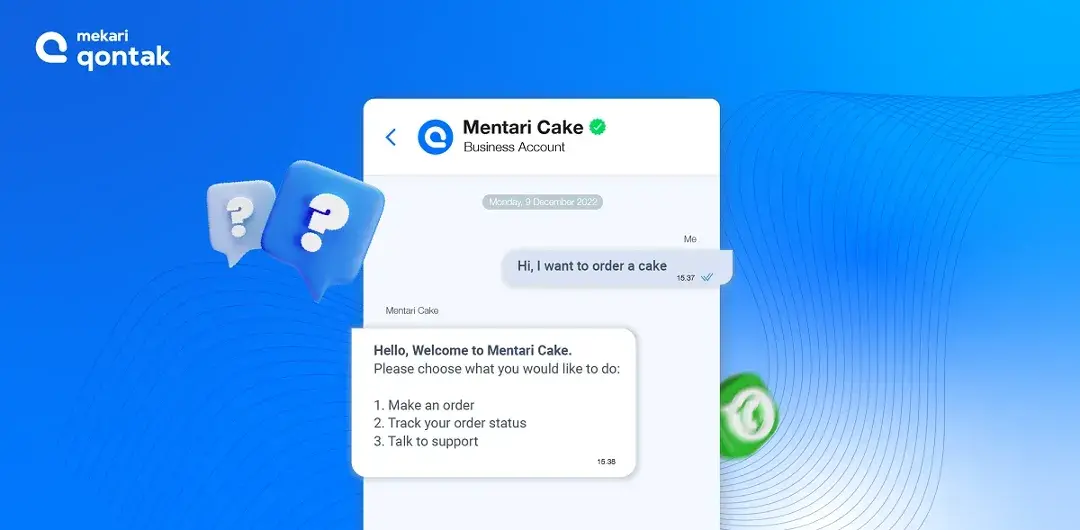
WhatsApp auto reply is a WhatsApp Business feature used to reply to customer messages automatically, so that businesses can respond to every incoming message in real time for 24 hours within one efficient communication system.
This WhatsApp Business auto reply message feature’s capability is able to improve customer service. Indirectly, customer trust also increases thanks to your commitment to serving them quickly.
How WhatsApp Auto Reply Works
The WhatsApp auto reply feature works by automatically sending a message in the form of a simple reply to a question asked by a customer. That answer comes from a chat template that you have created beforehand.
There are 3 kinds of patterns used in the best WhatsApp auto reply application, namely:
1. Keyword Matching
Before providing an answer, this feature will first scan the keyword entered by the user. Once detected, the customer’s message will be responded to with the answer that best matches or is most similar to the keyword used.
If the keyword is not found, then the auto reply system cannot provide an appropriate answer.
2. Providing Answer Options
The WhatsApp autoresponder also provides question options at the beginning of the conversation that can be selected directly by the prospect. Auto reply can only provide an answer after the customer selects the question option that has been provided by the system.
If the question asked by the prospect/customer is not among the options provided, then that prospect/customer will be directed to contact the call center.
3. Contextual
This last pattern requires strategic and directed planning, so that it can reply to messages using language like a human. Auto reply requires a fairly large database to be able to answer all forms of customer questions or requests.
The way to do this is by collecting customer data and conversation transcripts. The more data that is collected, the more the auto reply’s ability to respond also develops.
Easy Step to Create Auto Reply on WhatsApp Business
You can configure automatic messages directly from WhatsApp Business settings, including greeting messages, away messages, and quick replies. The following steps show how to set up WhatsApp Business auto-replies:
1. Log In to Your WhatsApp Business Account
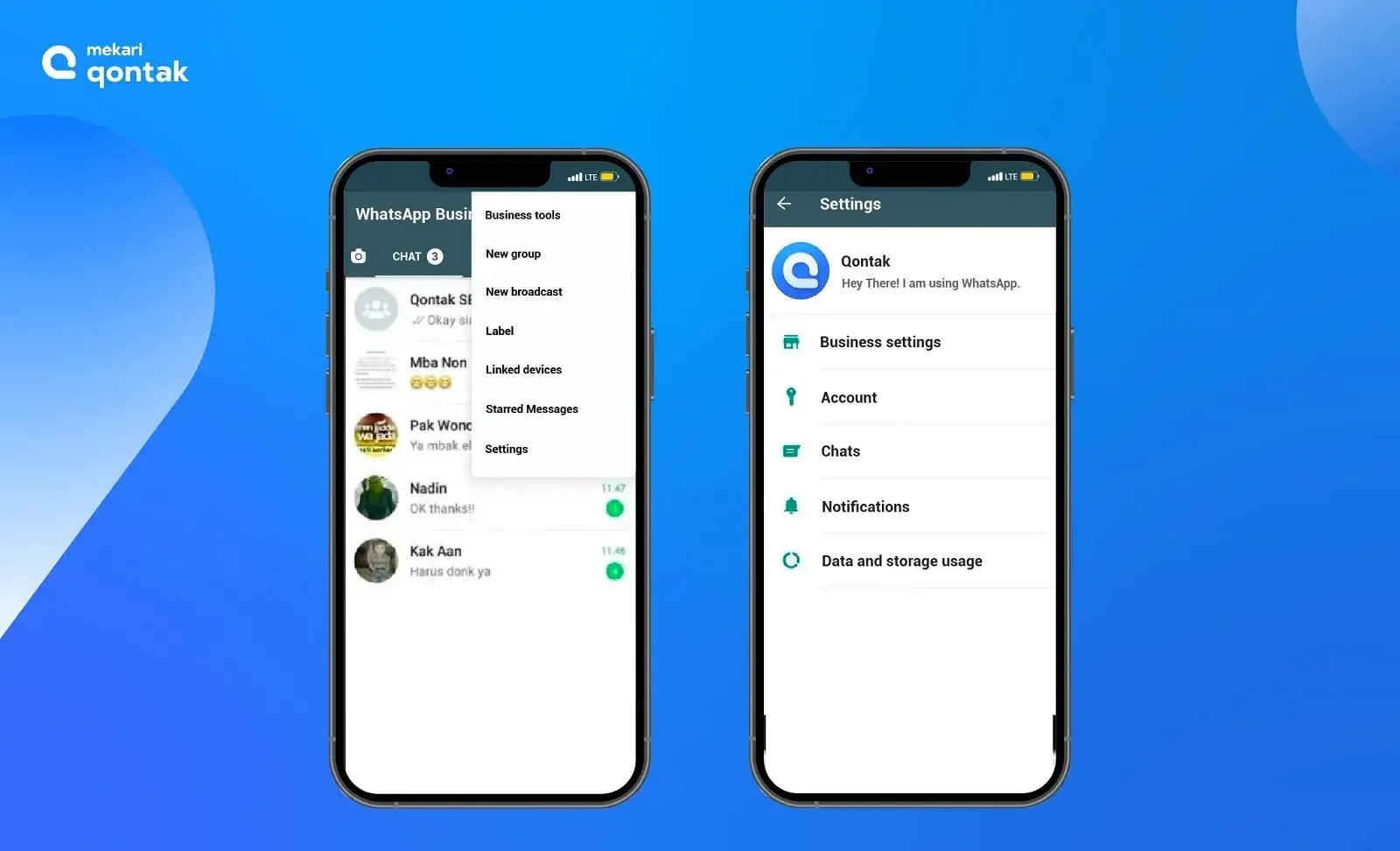
The way to log in to a WhatsApp Business account is the same as the way to log in to a regular WhatsApp account. After logging in, click the three dots in the upper right corner of your WhatsApp account, then select the “Settings” option.
2. Click the Business Features Option in Settings
This option contains several features that you can use for your business needs, such as business profile, catalog, messaging features, message labels, as well as the option to share your business WA account link.
3. Edit the Message Content in the Messaging Feature
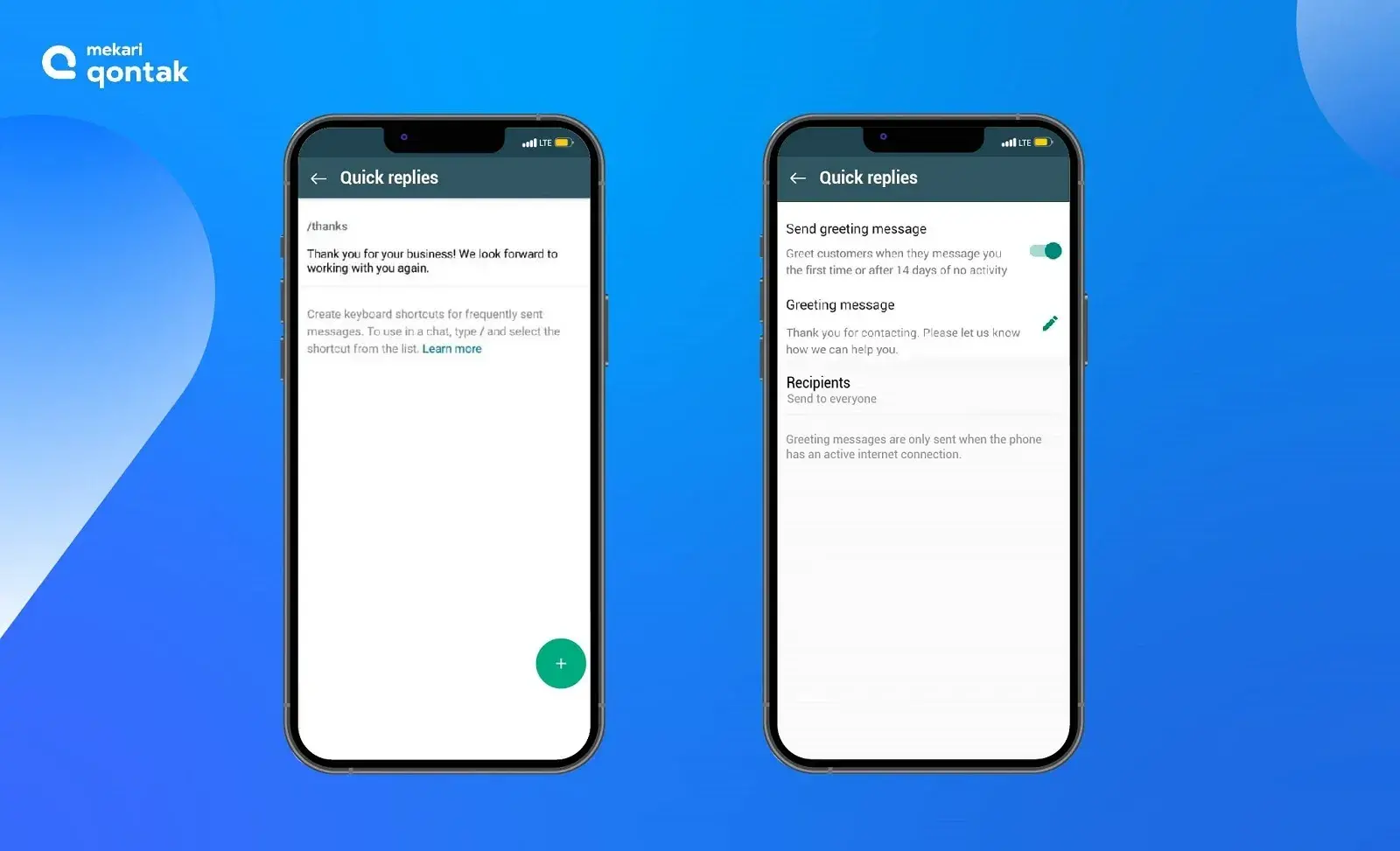
To activate WA auto reply, you can edit the content of the message you want to send to prospects/customers who contact you. There are several types of messages you can write, such as the following:
- After-hours message: The message you write will be sent automatically to people who contact you outside your working hours.
- Greeting Message: a message that automatically welcomes new prospects/customers.
- Quick reply: create a message containing answers to questions frequently asked of you so that you don’t have to bother typing the same answer for every identical question that comes into your account.
In addition, you can set the message sending schedule, and you can also set who the recipients of the autoresponder message on your WhatsApp Business account will be.
When compared to the capabilities of the best API-based WhatsApp auto reply application, the capabilities of regular WhatsApp Business are of course still far behind.
Therefore, you need to further consider using the WhatsApp Business API so that your business’s messaging process can run better.
How to Set Up Auto-Reply in WhatsApp Business API?
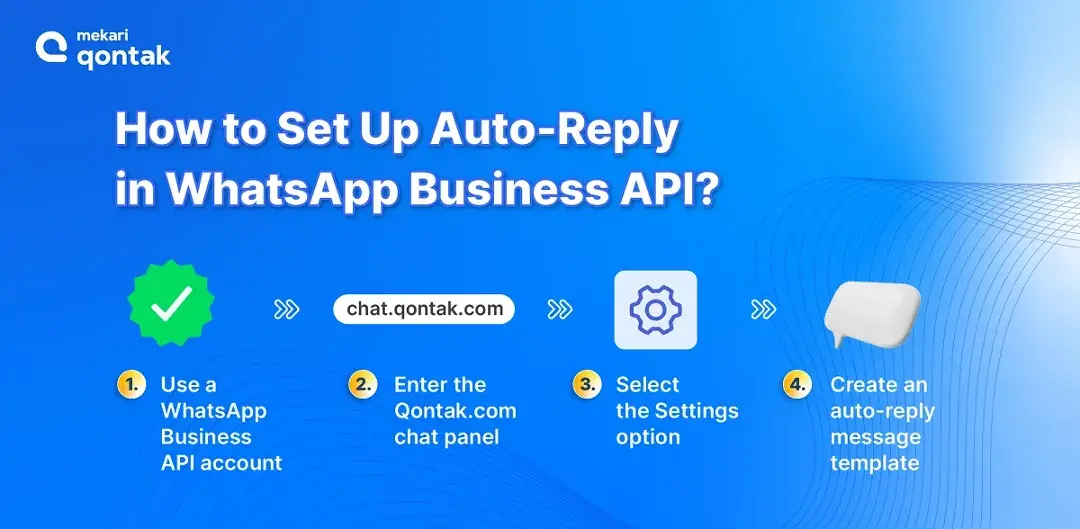
The way to create WhatsApp auto reply on the WhatsApp API so that it can be used by business owners is fairly easy. The following is a tutorial for creating a WhatsApp auto reply message on the WhatsApp Business API.
1. Register Your Business with Facebook Business Manager
The first step in creating WhatsApp Auto Reply is registering your business with Facebook Business Manager (FBM).
In this step, you need to prepare the following information:
- Business name
- Website
- Business email
- SIUP/NIB/NPWP
2. Partner with an Official BSP
The second step to creating WhatsApp auto reply is partnering with a WhatsApp API BSP such as Mekari Qontak.
A Business Solution Provider (WhatsApp BSP) such as Mekari Qontak will register your number with WhatsApp to obtain the WhatsApp API and assist you in every process of having a good WA business account.
Therefore, you need to choose a trustworthy and solution-oriented official WhatsApp vendor or partner.
3. Activate Your Number and Complete Your WA Profile
The fourth step to using wa auto reply is activating the number and filling in the business profile.
After obtaining the API, activate one number that you want to use as your business number. This number cannot be changed back into a regular WhatsApp number. Complete the profile by filling in business detail information, such as operating hours, product catalog, and so on.
As the BSP, Qontak will then work for you. The BSP will apply for the green tick or verified account and help you integrate it with the CRM software or other system that your business already uses.
4. Access the Mekari Qontak Omnichannel Dashboard
The fourth step in Creating WhatsApp Auto Reply is accessing the Omnichannel Dashboard of Mekari Qontak.
You will be given credentials to use when logging in to the Qontak chat panel. The menu display for an agent/admin and a supervisor will be different after logging in.
This is because an agent will only be able to reply to incoming messages, while a supervisor can also monitor incoming messages and carry out several settings.
5. Select the Settings Option to Configure the Auto Reply System and Templates
The last step, select the Settings option to configure the auto reply system and templates.
At this stage, you can go to the ‘Setting’ option on the left, then click the ‘Chat’ option as shown in the image. With the help of the Qontak team, you can build an auto responder system, working hours, various templates, and tags conveniently.
Advantages of Using WhatsApp Auto Reply
WhatsApp auto reply is one of the best alternatives for business owners to serve their customers. So it is reasonable that there is no limitation on field of business or industry for using the WhatsApp auto reply feature.
In addition, WA auto reply also has many benefits that are advantageous for businesses, making it very important for business owners.
The following are some benefits of the auto WhatsApp sender:
1. A 24/7 Customer Service Solution
WA Business auto reply will provide a response whenever a customer needs it, without being limited by the business’s operating hours. These questions are answered quickly and in real time, which speeds up the resolution of customer problems.
2. Safe to Use for Business
WA is equipped with end-to-end encryption security, in which all incoming and outgoing messages are guaranteed confidentiality. Only the users and businesses involved in the conversation can see the contents of the chat.
3. Improving Customer Relations
Auto reply builds a responsive and proactive conversation with customers. The conversation flow can be designed to be personalized, one way being through the greeting message feature, to create a better relationship with customers.
4. Collecting Feedback
WA Business auto reply can be used by the CS team to ask for feedback or input from customers. This is useful for businesses to better understand customer needs, which can become material in formulating a business improvement strategy.
5. Cost Savings
Auto reply is able to respond automatically 24 hours a day, non-stop. As a result, this makes businesses reduce customer service operational expenses, such as phone costs and employee salaries.
6. Increasing Sales
Most customers get recommendations and solutions to their questions from auto reply answers, without going through the CS team. This shows an improvement in customer experience, which has an effect on a better reputation. With a good business reputation, the opportunity to increase the number of sales on WhatsApp is greater.
Create a WhatsApp Auto Reply Message with the Mekari Qontak Solution!
The WhatsApp auto reply feature functions to respond to messages automatically. This feature helps businesses improve customer service.
The way to create a WhatsApp auto message is also relatively easy. This feature can be used on the WhatsApp Business application and the WhatsApp Business API.
The way to create WhatsApp API auto reply requires an initial step, namely building the API system through an official WhatsApp BSP partner.
Mekari Qontak AI-powered WhatsApp Business API can help you obtain the leading WhatsApp features you need, such as integrating your WhatsApp with an omnichannel CRM and other systems.
Mekari Qontak is a complete all-in-one solution, the best WhatsApp auto reply application for improving your business, and it is equipped with other advanced features such as the blue tick, WhatsApp chatbot, WA blast, and Agentic AI.
In addition, Mekari Qontak has been trusted by more than 55,000+ companies in growing their businesses together.
Discuss your business needs with Mekari Qontak teams and get a free trial now.
Frequently Asked Question About Auto Reply WhatsApp (FAQ)
Can WhatsApp Auto Reply personalize messages for different customers?
Can WhatsApp Auto Reply personalize messages for different customers?
Yes! The level of personalization depends on the system used. Basic auto replies rely on predefined messages, while more advanced setups can use customer and conversation data to create more contextual responses.
Can WhatsApp Auto Reply transfer a conversation to a human agent?
Can WhatsApp Auto Reply transfer a conversation to a human agent?
Yes. Businesses can use automation as the first layer of communication and route more complex or specific customer requests to a human agent.
Can WhatsApp Auto Reply handle a high volume of customer messages?
Can WhatsApp Auto Reply handle a high volume of customer messages?
Yes, but businesses with larger conversation volumes may require an API-based solution and centralized conversation management to handle interactions more efficiently.
Can WhatsApp Auto Reply be integrated with a CRM?
Can WhatsApp Auto Reply be integrated with a CRM?
Yes. WhatsApp Business API can be connected with CRM and other business systems, allowing customer conversations to become part of a broader customer engagement workflow. Pasted text
What happens when an auto reply cannot answer a customer's question?
What happens when an auto reply cannot answer a customer's question?
The outcome depends on how the automation is configured. Businesses can provide a fallback message, offer alternative options, or direct the customer to a human support channel.